


Safety apps are changing how people respond to danger. Just like Uber changed how people book a cab, a safety app changes how people get help in an emergency. One tap, and the right people know where you are and what is happening.
If you are planning to build an Uber like safety app for Android, this guide is for you. We will walk through what such an app actually does, which features it needs, how the Android platform affects your build, what it costs, and what mistakes to avoid. We will also cover the parts that most guides skip completely, like Android's background location rules, India's emergency number system, and data protection law. By the end, you will have a complete, practical picture of what it takes to build a safety app that actually works when someone needs it.
This guide is brought to you by Digiconn Unite, a team that offers full mobile app development services including Android app development, backend systems, and ongoing support for safety-focused platforms.
What Is An Uber Like Safety App?
An Uber like safety app borrows one simple idea from Uber: connect a person who needs something to the nearest person who can provide it, instantly and automatically. In Uber's case, that something is a ride. In a safety app, that something is help.
When a user triggers an alert, the app does several things at once. It shares the user's live location. It notifies trusted contacts or nearby verified helpers. It can also alert local authorities if the situation is serious enough. The entire process is designed to take seconds, not minutes, because in an emergency, every second matters.
This is different from a simple "emergency contact" app that just sends one SMS. A true Uber like safety app behaves like a small, focused network. It has users who might need help, helpers or responders who can offer it, and an admin system that keeps the whole network safe, verified, and accountable.
Why Build A Safety App On Android First?
Android dominates the smartphone market in India and across most of Asia, Africa, and Latin America. If your target users are in these regions, building for Android first makes practical sense, both for reach and for budget.
There are also Android-specific reasons this matters for a safety app specifically:
- Android allows deeper background processes, which safety apps often rely on for things like shake detection and continuous location sharing
- Android devices span a huge price range, so your app needs to run well even on lower-end phones, which is common among many user groups who need safety apps the most
- Android's permission system has changed significantly in recent versions, and a safety app's core function depends entirely on getting these permissions right
We will get into the specific Android permission rules a little later, because this is one of the most overlooked parts of safety app development.
Why Personal Safety Apps Are In High Demand Right Now
Personal safety concerns have grown steadily across Indian cities and towns. Working professionals travelling late, students returning from coaching classes, delivery riders out at odd hours, and elderly people living alone are all groups actively looking for a reliable safety net.
At the same time, India's government has built a strong digital backbone for emergency response through the 112 India system, run under the Emergency Response Support System (ERSS) by the Ministry of Home Affairs. This single number connects citizens to police, fire, medical, and women's safety services across the country, through voice calls, SMS, WhatsApp, and the 112 India app itself.
This matters for your app in two ways. First, it shows that government infrastructure already exists for emergency response, which your app can integrate with rather than try to replace. Second, it tells you that users are increasingly comfortable with app-based emergency reporting, which makes them more likely to trust and use a private safety app alongside government services.
This Might Be Useful: Multi Vendor iOS App Development Company in Agra
Global Personal Safety App Market Size and Growth
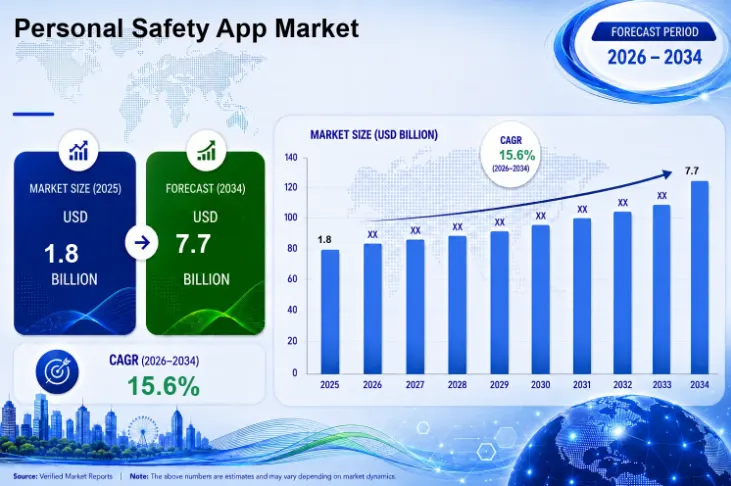
The demand for safety apps is not just a feeling, it is backed by real numbers. According to Verified Market Reports, the global Personal Safety App Market was valued at approximately USD 1.8 billion in 2025 and is projected to reach USD 7.7 billion by 2034, growing at a strong CAGR of 15.6% between 2026 and 2034.
This is a steady, consistent upward curve, not a short-term spike. Year after year in the forecast, the market keeps climbing, which tells us this is a genuine long-term shift in how people think about personal safety, not a passing trend tied to one news cycle or one viral incident.
A few numbers from this market are especially relevant if you are building specifically for Android, which is the focus of this guide.
Android leads platform adoption. Industry data shows Android holds a dominant share of the personal safety app market, largely because of its wider global user base, flexible app development ecosystem, and affordability across price-sensitive markets like India. This directly supports the Android-first approach covered earlier in this guide.
Growth is being driven by real safety concerns, not novelty. The market's growth is fuelled by rising concerns over personal security, especially among women, children, and elderly users, combined with deeper smartphone penetration across both developed and emerging markets, including India.
This is still an early-stage, fast-growing market. A market growing at over 15% CAGR every year for nearly a decade means there is significant room for new, focused players, not just the handful of global names already known in this space. A well-built, India-aware safety app, especially one that integrates with local infrastructure like the 112 emergency number covered earlier, is entering a market with genuine room to grow rather than one that is already saturated.
For anyone evaluating whether now is the right time to invest in building a safety app, this data answers that question clearly. The market is large, growing quickly, and still has space for well-built, trustworthy platforms to capture meaningful users.
Source: Verified Market Reports, Personal Safety App Market forecast (2026–2034)
Core Features Your Uber Like Safety App Must Have
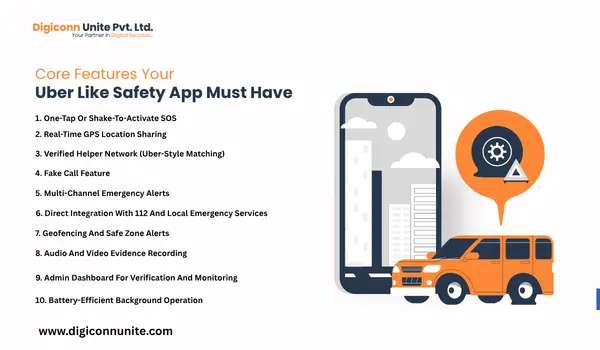
A safety app is only as good as its features, and in this category, every feature must work instantly, without confusion, and without needing the user to think too hard during a crisis.
1. One-Tap Or Shake-To-Activate SOS
The single most important feature. A user in danger should never need to unlock several screens to ask for help. A dedicated SOS button, or a shake gesture using the phone's accelerometer, should trigger the alert in under two seconds.
Once triggered, the app should immediately begin broadcasting the user's location and sending alerts, without requiring any further action from the user.
2. Real-Time GPS Location Sharing
This is the backbone feature, and it is exactly what powers Uber's "see your driver coming" experience. In a safety app, the same technology shows the user's live location to trusted contacts and verified helpers nearby.
On Android, this feature needs careful handling because of background location restrictions, which we cover in detail further down this guide.
3. Verified Helper Network (Uber-Style Matching)
Just as Uber shows nearby available drivers, a safety app should show nearby verified helpers who have opted in to respond. This is what truly makes the "Uber like" comparison work. When an SOS goes out, the system should automatically identify and notify the closest available helper.
Verification here is non-negotiable. Every helper should go through identity checks before they can receive or respond to alerts. Without this, you are not building a safety network, you are building a liability.
4. Fake Call Feature
A quiet but powerful feature. It lets a user trigger a realistic-looking incoming call to safely exit an uncomfortable or risky situation without alerting the person around them. Many real-world safety app users rely on this far more often than the SOS button itself, simply because it helps prevent situations before they escalate.
5. Multi-Channel Emergency Alerts
When an SOS is triggered, the alert should go out through multiple channels at the same time, push notification, SMS, WhatsApp, and email. Indian users frequently move between areas with weak mobile data, so SMS-based alerts are especially important as a fallback when internet connectivity drops.
6. Direct Integration With 112 And Local Emergency Services
This is something none of the popular safety app guides currently cover in detail, and it is a genuine gap worth filling. Rather than treating government emergency services as a separate system, your app can be designed to escalate directly to 112 when a situation needs official intervention, pre-filling the user's location and basic details to save critical time.
This single feature can be a strong differentiator for an Indian-focused safety app, since it bridges a private safety network with the country's official emergency response system instead of working in isolation from it.
7. Geofencing And Safe Zone Alerts
Geofencing lets the app notify trusted contacts automatically if a user enters or leaves a defined area, useful for parents tracking children, families monitoring elderly relatives, or companies tracking field staff safety.
8. Audio And Video Evidence Recording
When an SOS is active, the app can automatically begin recording audio or video in the background and upload it securely to the cloud. This serves two purposes: it can act as evidence later, and recording itself sometimes discourages an attacker simply by existing.
9. Admin Dashboard For Verification And Monitoring
Behind every good safety app is a strong admin panel. Operators need the ability to verify new helpers, monitor live incidents, review flagged accounts, and pull reports on response times. A weak admin panel is one of the most common reasons safety apps fail after launch, even when the user-facing app looks polished.
10. Battery-Efficient Background Operation
A safety app that drains the battery quickly will get uninstalled, no matter how good its features are. Efficient background location tracking, smart use of Android's foreground service types, and minimal data usage are not optional extras, they are part of the core product experience.
How AI Is Making Safety Apps Smarter
Artificial intelligence is changing what a safety app can do, moving it from a passive alert tool to something that can sense trouble before a user even presses the SOS button.
Automatic threat detection through voice and motion patterns. Some advanced safety apps use the phone's microphone and accelerometer together to detect signs of distress, like a sudden scream, a struggle, or an unusual fall pattern, and can trigger an alert automatically without requiring the user to tap anything.
Smart helper matching. Rather than simply finding the nearest helper by distance, AI-based matching can factor in a helper's response history, verification level, and current availability to choose the most reliable responder, not just the closest one.
Predictive risk zones. By analysing historical incident data, an AI layer can highlight areas or times where alerts have been more frequent, helping users make safer route choices proactively rather than reactively.
Fraud and false alert filtering. AI can help distinguish a genuine emergency from accidental triggers, reducing the number of false alarms that responders need to act on, which keeps the entire helper network efficient and willing to keep responding.
Multilingual voice support. For an Indian audience especially, AI-powered voice recognition that understands regional languages makes the app usable for people who may not be comfortable navigating an English-only interface during a stressful moment.
None of these AI features replace the basic, reliable fundamentals covered earlier in this guide. They are an enhancement layer, not a substitute for solid SOS activation, verified helpers, and dependable background location tracking.
Designing For Women's Safety: A Closer Look
Women's safety is one of the most common and important use cases for this category of app in India, and it deserves its own focused attention rather than being treated as just another feature checklist item.
Trusted circle setup during onboarding.
Rather than asking a user to add emergency contacts after something has already gone wrong, the onboarding flow should make it natural and quick to set up a trusted circle of family or friends right from the first use.
Route sharing for commutes.
Many women travelling alone, especially late at night or using cabs and autos, want the option to share a live route with a trusted contact for the duration of a single journey, not just a one-time SOS alert.
Discreet activation methods.
Beyond a visible SOS button, options like a hidden gesture, a volume button sequence, or a voice trigger phrase let a user activate help without an aggressor noticing.
Community-verified safe spaces.
Some safety apps allow users to mark and rate certain locations, like well-lit streets, 24-hour shops, or police outposts, as safe spaces nearby, built from real community input over time.
Sensitivity in helper assignment.
For certain use cases, allowing a user to indicate a preference for a woman responder, where available and appropriate, can increase comfort and trust in the response itself.
Building specifically with this use case in mind, rather than assuming a generic safety app design fits everyone equally well, often makes the difference between an app that gets installed once and one that becomes a daily habit.
This is the section most competing guides either skip entirely or mention only briefly. Since this guide is specifically about building on Android, getting these technical details right is what separates an app that works from one that gets rejected, crashes, or silently fails in the background.
You May Also Like: On Demand Grocery Android App Development Company in Agra
Understanding Foreground Vs Background Location On Android
Android treats location access very differently depending on whether your app is visible to the user or running behind the scenes.
Foreground location access applies when your app's screen is visible, or when a foreground service is actively running with a visible notification. This is the most transparent method from Android's point of view, and it is the method Google Play prefers wherever possible.
Background location access applies when your app continues to access location after the user has left the app or pressed the home button. For a safety app, some background access is genuinely necessary, since a user might trigger an SOS and then put their phone in their pocket while help is on the way.
Since Android 10, apps must explicitly declare the ACCESS_BACKGROUND_LOCATION permission to do this, and Google Play requires a separate permission declaration and review process before approving background location use. Apps that request this permission without a clear, justified use case risk having their updates blocked or the app removed from the Play Store entirely.
Foreground Service Types Are Mandatory
If your app targets newer Android versions, you cannot simply run a background location service without declaring its type. Android requires you to declare the specific foreground service type, such as location, in your app manifest, along with the matching permission such as FOREGROUND_SERVICE_LOCATION. Skipping this step causes the system to throw a security exception, which will crash exactly the feature your users depend on most.
This means your development team needs to plan the SOS and live-tracking flow carefully from day one, not bolt it on after the rest of the app is built.
Designing Around Android's Battery Optimisation
Many Android devices, especially those from certain manufacturers, aggressively kill background processes to save battery. A safety app must guide users through whitelisting the app from battery optimisation during onboarding, otherwise the SOS feature may silently fail to send updates exactly when it matters most.
Permission Requests Must Be Honest And Minimal
Android's permission model rewards apps that request only what they truly need. Asking for background location, camera, microphone, and contacts all at once during first launch will scare away users and increase your chances of Play Store rejection. A well-built safety app requests permissions gradually, explaining clearly why each one is needed at the exact moment it becomes relevant.
Safety App Vs Ride-Hailing App: Why They Are Not The Same Build
A lot of confusion exists online because many "how to build an app like Uber" guides are actually about building a taxi or ride-hailing app, not a safety app. While both borrow the same underlying idea of real-time matching and live location tracking, the actual feature priorities are very different.
| Aspect | Ride-Hailing App | Safety App |
|---|---|---|
| Primary goal | Book and complete a paid ride | Get emergency help as fast as possible |
| Speed requirement | Seconds to minutes is acceptable | Must respond in under 2-3 seconds |
| Verification needs | Driver licence and vehicle checks | Strict identity verification of every helper |
| Payment system | Core requirement | Usually not required at all |
| Background location | Important, but not life-critical | Life-critical, must never silently fail |
| Admin panel priority | Manages rides, fares, drivers | Manages incidents, verification, abuse reports |
| Worst-case failure | Delayed ride, refund issued | Potential harm to a real person |
If your project is genuinely about a safety app, make sure your development partner understands this distinction clearly. A team experienced only in building taxi apps may default to ride-hailing patterns that do not fit a safety use case at all.
Step-By-Step Process To Build An Uber Like Safety App
Step 1: Define The Problem And The User
Before any design or development work begins, get specific about who you are building for. A safety app for working women travelling at night has different priorities compared to one built for elderly citizens living alone, or one built for school children. Each group has different trusted contacts, different trigger methods, and different comfort levels with technology.
Step 2: Plan The Three Core Panels
Every Uber like safety app is really three connected systems working as one.
The user app is where people register, set up trusted contacts, and trigger the SOS when needed.
The helper or responder app is where verified helpers see nearby alerts, accept requests, and navigate to the user's location.
The admin panel is the control centre where your team verifies users, monitors incidents, and manages the overall health of the platform.
Step 3: Design For Stress, Not For Beauty
Safety app design follows a different rule compared to most consumer apps. The person using it is often scared, in a hurry, or in a dangerous situation. This changes every design decision.
Buttons must be large and reachable with one hand. Navigation must be minimal, ideally one tap to trigger help. Visuals need high contrast so they remain visible even in poor lighting or when a phone screen is partially obscured. Every screen should be tested against the question: would this still work if someone's hands were shaking?
A few specific design principles matter more here than in almost any other app category. The SOS trigger should be reachable from the lock screen or a widget, not buried three taps deep inside a menu. Confirmation steps, where the app asks "are you sure?" before sending an alert, should be used sparingly, since extra steps cost precious seconds, though a very short cancel window can help prevent accidental triggers without slowing down a genuine one. Colour choices matter too: red is the obvious choice for danger, but it should be paired with clear text labels rather than colour alone, since not every user processes colour cues the same way under stress.
Error states deserve particular attention. If a location fails to send, or a helper cannot be reached, the app should never fail silently. It should clearly show what has happened and offer an immediate next step, such as falling back to an SMS alert or escalating directly to the 112 emergency number.
Step 4: Choose The Right Technology Stack
For an Android-first Uber like safety app, a sensible technology stack typically looks like this:
Mobile app (Android): Kotlin for native development, or Flutter if you also plan an iOS version later using the same codebase.
Backend: Node.js or Django for handling real-time requests, with WebSockets to maintain a live connection between users and helpers during an active SOS event.
Database: PostgreSQL for structured data like user profiles and incident records, paired with a fast caching layer like Redis for real-time helper availability.
Location services: Google's Fused Location Provider API, combined with the Geofencing API for safe-zone alerts.
Notifications: Firebase Cloud Messaging for push notifications, paired with an SMS gateway for fallback alerts when data connectivity is weak.
Cloud hosting: AWS or Google Cloud, chosen for reliability and the ability to scale quickly if your user base grows fast after launch.
Step 5: Build, Then Test Far More Than You Think You Need To
Development of the user app, helper app, and admin panel typically happens in parallel once the core architecture is settled. But testing a safety app needs a different level of rigour compared to a typical consumer app.
Test the SOS flow under poor network conditions, not just on office WiFi. Test what happens when the phone's battery is critically low. Test how the app behaves if a user accidentally denies a key permission. Test the entire flow from trigger to helper arrival, end to end, multiple times, with real people, not just internal team members.
Step 6: Run A Closed Beta Before Public Launch
A small, controlled beta with real target users, not just friends and colleagues, will surface problems no amount of internal testing will catch. People in your actual target group will use the app differently than your development team expects, and that gap is exactly what a beta is meant to close.
Step 7: Launch, Then Treat Maintenance As Part Of The Product
A safety app does not become "finished" at launch. Operating system updates, especially Android's frequent changes to permission and background service rules, can quietly break core features if your team is not actively monitoring and updating the app. Most experienced teams budget around 15 to 20 percent of the original development cost every year specifically for maintenance.
Data Privacy And Legal Considerations For A Safety App In India
A safety app, by its nature, collects some of the most sensitive personal data possible: real-time location, emergency contacts, identity documents for helper verification, and sometimes audio or video recordings. This makes data protection a genuine legal responsibility, not just good practice.
India's Digital Personal Data Protection Act sets out clear obligations for any platform collecting personal data, including the need for clear user consent, defined data retention limits, and strong security safeguards. A safety app handling location history and identity verification data needs to think about compliance from the very first planning stage, not as an afterthought before launch.
Practical steps that matter here include encrypting stored location and personal data, giving users clear control over who can see their location and for how long, deleting incident data after a reasonable retention period unless legally required to keep it, and being transparent in your app's privacy policy about exactly what data is collected and why.
You May Be Like It: Android vs iOS App Development: 10 Major Differences
Monetisation: How A Safety App Can Actually Generate Revenue
Unlike a ride-hailing app, a safety app cannot simply charge a commission on every emergency, since that would be both unethical and impractical. Monetisation here needs a different approach.
Freemium with premium safety features. Core SOS and location sharing remain free, while advanced features like extended helper networks, family tracking circles, or priority response options sit behind a subscription.
B2B and institutional licensing. Schools, corporate offices, housing societies, and transport companies often need safety solutions for the people under their care. Licensing your platform to these institutions can be a far steadier revenue source than relying on individual consumers alone.
White-label partnerships. Once your core platform is built and proven, the same codebase can be licensed to other organisations who want their own branded safety app without building one from scratch.
Government and NGO collaboration. Many state governments and women's safety initiatives actively look for technology partners. A well-built, verified safety platform can become a partner in these programmes rather than a purely commercial product.
Mistakes To Avoid While Building A Safety App
Overloading the app with features at launch. A bloated, slow app is dangerous in a category where speed is the entire point. Launch with a focused set of core features and expand only after real usage data tells you what users actually need.
Skipping helper verification to grow the network faster. This single shortcut can turn a safety platform into a genuine risk to its own users. Verification must never be optional, even if it slows initial growth.
Ignoring low-connectivity scenarios. Many parts of India still have inconsistent mobile data. If your app's SOS feature depends entirely on internet connectivity with no SMS-based fallback, it will fail exactly when a user needs it most.
Underestimating the Android permission and background service rules. As covered earlier, getting ACCESS_BACKGROUND_LOCATION and foreground service types wrong does not just create a bug, it can get your app removed from the Play Store, or worse, cause it to silently fail during a real emergency.
Building without talking to real potential users first. Assumptions about what makes someone feel safe are often wrong. Direct conversations with your actual target audience will reshape your feature list more than any amount of competitor research.
Treating the admin panel as an afterthought. A weak admin system means slow verification, poor incident tracking, and no real way to catch abuse on the platform. This is often the single biggest gap between a safety app that looks good in a demo and one that holds up in real use.
Getting Your Safety App Approved On The Google Play Store
Safety apps face a more detailed review process on the Play Store compared to most categories, simply because they request sensitive permissions like background location, camera, and microphone access. Planning for this review process early saves weeks of back-and-forth after you thought development was finished.
Prepare a clear permissions declaration. For every sensitive permission your app requests, Google Play asks for a written explanation of why it is needed and how it benefits the user, along with a short video demonstrating the feature in action. This applies directly to background location and any foreground service types your app uses.
Write a precise, honest privacy policy. Your privacy policy needs to explicitly cover what location, identity, and incident data is collected, how long it is retained, and who can access it. A vague or generic privacy policy is one of the most common reasons safety and tracking apps get flagged during review.
Avoid requesting permissions you do not strictly need. Reviewers, both automated and human, look closely at whether your declared use case genuinely requires each permission. Requesting contacts access "just in case" when your app does not actually use it anywhere increases your rejection risk for no real benefit.
Plan for a slower first review. Apps in sensitive categories like safety, health, and finance often take longer for initial approval. Build this extra time into your launch timeline rather than assuming a same-week approval.
Keep a working demo account ready. Reviewers may need to test your SOS and helper-matching flow directly. Having a pre-configured demo account with sample helpers and contacts ready speeds up this process considerably.
Cost To Build An Uber Like Safety App On Android
Development cost depends heavily on feature scope, design complexity, and which platforms you target. For an Android-first build with a genuinely complete feature set, including the user app, helper app, and admin panel, costs typically fall in the following ranges.
| Component | Estimated Cost Range (INR) |
|---|---|
| User app (Android, core SOS and tracking features) | ₹3,00,000 – ₹8,00,000 |
| Helper or responder app | ₹2,50,000 – ₹6,00,000 |
| Admin panel and dashboard | ₹1,50,000 – ₹4,00,000 |
| Backend infrastructure and APIs | ₹2,00,000 – ₹6,00,000 |
| UI/UX design for all panels | ₹80,000 – ₹2,50,000 |
| Testing, QA, and deployment | ₹50,000 – ₹1,50,000 |
A genuinely basic MVP version, covering only SOS activation and live location sharing, can be built at the lower end of these ranges, while a fully featured platform with helper matching, geofencing, and 112 integration sits toward the higher end. Always ask any mobile app development services provider for a detailed, written breakdown before committing to a budget.
How Long Does It Take To Build A Safety App?
A focused MVP covering SOS activation, live location sharing, and basic alerts can typically be built in 8 to 12 weeks. A fully featured platform with verified helper matching, geofencing, multi-language support, and government emergency integration usually takes 4 to 7 months, depending on team size and how quickly feedback loops from testing are closed.
Why Choose Digiconn Unite For Your Safety App Development
Digiconn Unite offers complete mobile app development services, from the first planning conversation through to post-launch support, for Android apps and also iOS app development that need to be reliable under pressure, not just polished in a demo.
Here is what working with Digiconn Unite on a safety app project looks like in practice.
Android-first technical expertise. The team understands the specific Android permission and background service rules covered in this guide, which means your SOS and live tracking features are built to survive real-world Android updates, not just pass a quick demo.
Full-stack delivery under one roof. User app, helper app, admin panel, and backend infrastructure are handled by one accountable team, avoiding the communication gaps that come from juggling multiple vendors on a project where reliability genuinely matters.
India-aware design. From SMS fallback for low-connectivity areas to thoughtful integration with India's 112 emergency system, the team builds with the realities of the Indian market in mind, not a generic global template.
Transparent process and reporting. You receive clear updates at every stage of development, along with a written cost and timeline breakdown before work begins, so there are no surprises later.
Long-term support, not just a handover. Since Android's permission rules and OS versions change frequently, ongoing maintenance is treated as a core part of the relationship, not an optional add-on you discover you need only after something breaks.
If you are exploring mobile app development services for a safety platform, or any Android application where reliability cannot be compromised, Digiconn Unite is ready to walk through your specific requirements in detail.
Final Thoughts
Building an Uber like safety app is not just a coding exercise. It is building a system that real people will depend on during the worst moments of their day. Every design decision, every permission request, and every line of backend code carries more weight than it would in an average app.
Get the core fundamentals right: instant SOS activation, reliable background location on Android, genuine helper verification, and a connection to India's existing emergency infrastructure where it makes sense. Avoid the shortcuts that look fine in a demo but fail in a real crisis.
If you are ready to move from idea to a working, reliable Android safety app, Digiconn Unite offers the mobile app development services to help you build it the right way, from the first conversation through to long-term support after launch.
Frequently Asked Questions About Building An Uber Like Safety App
Is it necessary to build for both Android and iOS at the same time?
Not necessarily. Given Android's larger user base in India and most emerging markets, many safety app founders launch on Android first to validate the product, then expand to iOS once the core features are proven.
How does the app work in areas with poor mobile network coverage?
A well-built safety app includes an SMS-based fallback system, so SOS alerts and location details can still reach trusted contacts even when data connectivity is weak or unavailable.
Can the app be integrated with smartwatches or wearables?
Yes. Many modern safety apps support integration with wearable devices, allowing users to trigger an SOS alert directly from a smartwatch without needing to unlock their phone.
How is user privacy protected on a safety app?
Through encrypted data storage, restricted access controls, and giving users clear control over who can see their location, when, and for how long, in line with India's Digital Personal Data Protection Act requirements.
Does the app need to integrate with India's 112 emergency number?
It is not mandatory, but it is a strong differentiator. Direct integration with 112 means your app can escalate genuinely serious situations to official emergency services, with location and user details ready to share instantly.
What happens if a user denies the background location permission?
The app should be designed to gracefully fall back to foreground-only tracking and clearly explain to the user why background access improves their safety, rather than crashing or silently failing.
Can a safety app be monetised without charging users for emergencies?
Yes, through freemium premium features, institutional licensing to schools and companies, and white-label partnerships, rather than charging per emergency request.
How many people does a safety app's helper network need before it is useful?
This depends heavily on the target city or area. A focused launch in one neighbourhood or campus with a smaller, well-verified helper base is generally more effective than a large but unverified network spread too thin.
What is the biggest technical risk specific to building this on Android?
Mishandling background location permissions and foreground service types. Getting this wrong can mean the SOS feature silently fails exactly when a user is relying on it most, which is the single most damaging failure mode for this category of app.
Should I build the MVP myself or hire a mobile app development services provider?
Given the safety-critical nature of this app category, working with an experienced mobile app development services team is strongly advisable. Mistakes in permission handling, verification systems, or background reliability carry far higher consequences here than in a typical consumer app.
Related Topics
Explore more about mobile app development:
