



Best Tools for Website Development
The best tools for website development depend on the type of website you want to build. Visual Studio Code, GitHub, Figma, WordPress, React, Next.js, Chrome DevTools and Playwright are useful options for different stages of development. The right combination helps you design, code, test, secure and maintain a website without adding unnecessary complexity.
If you are planning a business website, landing page, eCommerce store or custom web application, choosing the right technology from the beginning can save development time and future maintenance costs.
Need a professional website for your business? Digiconn Unite is the web development company in Agra, helping businesses plan and develop websites around their requirements, functionality and growth goals. Contact the team to discuss your website project.
Quick Answer: Which Website Development Tools Are Best?
| Development requirement | Recommended tool | Best suited for |
|---|---|---|
| Writing and editing code | Visual Studio Code | Frontend and backend development |
| AI-assisted coding | GitHub Copilot or Cursor | Code suggestions and development assistance |
| Website design | Figma | UI/UX design and prototypes |
| Content management | WordPress | Business websites and blogs |
| Frontend development | React | Interactive user interfaces |
| Full-stack React development | Next.js | Production websites and web applications |
| Styling | Tailwind CSS or Bootstrap | Consistent website layouts |
| Version control | Git and GitHub | Tracking changes and collaboration |
| Website debugging | Chrome DevTools | Finding browser and performance issues |
| Automated testing | Playwright | Testing website journeys across browsers |
| API development and testing | Postman | Checking API requests and responses |
| Website deployment | Vercel, Netlify or suitable web hosting | Publishing websites online |
These tools do different jobs. You do not need all of them for every website.
Key Takeaways
-
Choose development tools according to your website's purpose, not popularity.
-
Use WordPress when content management and ease of editing are priorities.
-
Choose custom development when your website needs specialised functionality.
-
Use Git and GitHub to maintain a recoverable history of code changes.
-
Test websites on mobile devices and different browsers before launch.
-
Use AI coding assistants to speed up repetitive work, but review generated code.
-
Avoid adding frameworks and plugins that do not solve a real requirement.
Top 11 Tools for Website Development
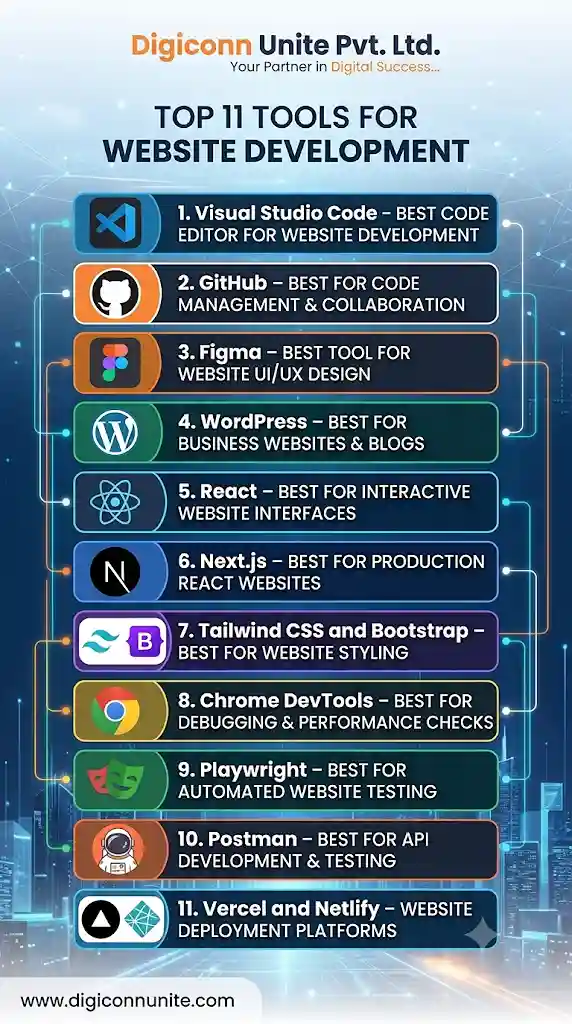
1. Visual Studio Code – Best Code Editor for Website Development
Visual Studio Code (VS Code) is a widely used code editor for writing and managing website code. It supports technologies such as HTML, CSS, JavaScript, PHP and Python through built-in features and extensions.
Developers can use it to build frontend layouts, backend functionality, APIs and custom website components.
Useful features:
-
Syntax highlighting and code completion.
-
Extensions for different programming languages.
-
Integrated terminal.
-
Git integration.
-
Debugging support.
-
Customisable development environment.
When should you use it?
Use VS Code when you are developing a website with HTML, CSS, JavaScript, PHP or a modern JavaScript framework.
Limitation: VS Code is an editor, not a complete website-building platform. You still need suitable programming languages, frameworks, hosting and development tools.
2. GitHub – Best for Code Management and Collaboration
GitHub helps developers store, manage and collaborate on website source code. It works with Git, a version control system that tracks changes made to files over time.
This is especially useful when multiple developers are working on the same website.
Why developers use GitHub:
-
Maintain code history.
-
Review changes before merging them.
-
Work on separate development branches.
-
Recover earlier versions of code.
-
Manage issues and development tasks.
-
Automate workflows using GitHub Actions.
Practical example: Suppose a developer updates your website's navigation menu and accidentally breaks another section. Version control makes it easier to identify the change and restore a working version.
When should you use it?
Use Git and GitHub for almost every custom development project, including small business websites. Even a solo developer benefits from having a reliable code history.
3. Figma – Best Tool for Website UI/UX Design
Figma is a collaborative design tool used to plan website layouts and user experiences before development begins.
It helps designers create visual prototypes so clients and developers can review how a website should look and behave.
Useful features:
-
Website wireframes.
-
High-fidelity page designs.
-
Clickable prototypes.
-
Reusable design components.
-
Design systems.
-
Developer handoff and collaboration.
When should you use it?
Use Figma when a website requires custom layouts, multiple page templates, dashboards, landing pages or a consistent visual identity.
Practical tip: Finalise the important page layouts before development starts. This reduces avoidable design changes after components have already been coded.
You May Like Also: How to Create Best Startup Landing Pages for Your Business
4. WordPress – Best for Business Websites and Blogs
WordPress is a content management system (CMS) that allows businesses to publish and manage website content without editing every page's source code.
It is commonly used for business websites, blogs, service pages and many content-driven websites.
Useful capabilities:
-
Manage pages and blog posts.
-
Use themes to control website appearance.
-
Add functionality through plugins.
-
Manage users and publishing permissions.
-
Organise content using categories and tags.
-
Extend functionality through custom development.
When should you use it?
WordPress can be a good choice when your business regularly publishes articles, updates service pages or needs a website that non-technical team members can manage.
What to watch out for: Installing too many plugins can create maintenance, security and performance problems. Select reliable plugins, keep them updated and remove anything that is no longer needed.
5. React – Best for Interactive Website Interfaces
React is a JavaScript library for building user interfaces using reusable components.
Instead of developing every interface element separately, developers can create components and reuse them across different pages.
For example, a booking application may have reusable components for search filters, property cards, navigation menus and enquiry forms.
Useful capabilities:
-
Reusable UI components.
-
Interactive interfaces.
-
State management through React features and suitable libraries.
-
Component-based development.
-
Integration with APIs.
When should you use it?
React is suitable for interactive web applications, customer dashboards, booking interfaces and websites with complex user interactions.
Limitation: React is not a complete backend or hosting solution. Developers must choose suitable tools for routing, data management, server functionality and deployment.
6. Next.js – Best for Production React Websites
Next.js is a React framework that provides additional capabilities for building production websites and web applications.
It supports different rendering approaches, routing, server-side functionality and optimisation features.
Useful capabilities:
-
File-based routing.
-
Server-side rendering.
-
Static site generation.
-
Server components.
-
Image optimisation features.
-
Backend functionality through supported application routes.
When should you use it?
Next.js is worth considering when you need a React-based website with structured routing, server-rendered pages, content-driven sections or more advanced application functionality.
For a simple five-page business website, a full Next.js setup may be unnecessary. Choose it when its capabilities solve an actual project requirement.
7. Tailwind CSS and Bootstrap – Best for Website Styling
CSS frameworks help developers create consistent layouts and responsive website designs.
Two common options are Tailwind CSS and Bootstrap.
Tailwind CSS
Tailwind CSS uses utility classes to style elements directly in the markup.
It is useful when developers want control over spacing, colours, typography and responsive layouts.
Bootstrap
Bootstrap provides ready-made layout utilities and interface components.
It can help developers build standard responsive layouts quickly without designing every common component from scratch.
Which one should you choose?
Choose Tailwind CSS when you need a customised design system and have a team comfortable with utility-based styling.
Choose Bootstrap when you want a familiar component and grid system for a conventional website.
You do not need both for most projects. Using two styling systems can create unnecessary complexity.
8. Chrome DevTools – Best for Debugging and Performance Checks
Chrome DevTools is a set of browser-based development tools that helps developers inspect and troubleshoot websites.
It is useful for identifying problems that may not be visible when looking at the website's design alone.
What can you check?
-
HTML structure and CSS styling.
-
JavaScript errors.
-
Network requests.
-
Image and resource loading.
-
Mobile responsive layouts.
-
Storage and cookies.
-
Performance bottlenecks.
Practical example: If a contact form is not submitting, the Console and Network panels can help identify JavaScript errors or failed server requests.
Use DevTools throughout development, not just after a website has been completed.
9. Playwright – Best for Automated Website Testing
Playwright is an automated browser testing tool. It can simulate user actions and check whether important website functions work correctly.
It supports testing across major browser engines.
What can you test?
-
Navigation links.
-
Login and registration.
-
Contact forms.
-
Search functionality.
-
Checkout processes.
-
Responsive layouts.
-
Important user journeys.
For example, an eCommerce website can use an automated test to open a product page, add an item to the cart and check whether the checkout process loads correctly.
When should you use it?
Playwright is particularly useful for websites with complex forms, user accounts, bookings, payments or frequent code updates.
For a simple static website, manual testing may be sufficient at first.
10. Postman – Best for API Development and Testing
APIs allow different software systems to exchange information. A website may use APIs to retrieve product data, process bookings, access customer accounts or connect to external services.
Postman helps developers send requests and inspect API responses.
Useful capabilities:
-
Test HTTP requests.
-
Inspect response data.
-
Work with authentication.
-
Organise API collections.
-
Document API behaviour.
-
Test different request parameters.
Example: A travel booking website may use an API to retrieve available tour packages. Developers can test the API response before connecting it to the website interface.
Postman is useful when your website depends on backend services or third-party integrations.
11. Vercel and Netlify – Website Deployment Platforms
After development and testing, a website needs to be deployed so people can access it online.
Vercel and Netlify are popular platforms for deploying modern frontend websites and supported application frameworks.
Vercel
Vercel is particularly useful for projects built with Next.js and other supported frontend frameworks.
Netlify supports modern web projects, static websites, deployment workflows and related web services.
Before choosing a deployment platform, check:
-
Framework compatibility.
-
Hosting and bandwidth requirements.
-
Custom domain support.
-
SSL certificate support.
-
Build and deployment workflow.
-
Server-side functionality requirements.
-
Backup and recovery options.
A traditional PHP website or WordPress website may be better suited to compatible managed hosting or a VPS rather than a frontend-focused deployment platform.
How to Choose the Right Website Development Tools
The best development stack is the one that supports your website without making it unnecessarily difficult to maintain.
Use this decision table to shortlist your tools.
| Website requirement | Suggested starting stack |
|---|---|
| Small business website | WordPress, suitable hosting, browser testing |
| SEO-focused content website | WordPress or another suitable CMS |
| Custom company website | HTML, CSS, JavaScript, VS Code, Git |
| Interactive web application | React or Next.js, GitHub, API tools |
| eCommerce website | Suitable eCommerce platform or custom stack |
| Customer dashboard | React or Next.js, backend, database, Playwright |
| Landing page | WordPress, Webflow or lightweight custom HTML/CSS |
| Enterprise website | Framework and infrastructure selected around security, scale and integration requirements |
A counter-intuitive rule: More tools do not mean a better website
A small business website may not need React, Next.js, Docker, multiple CSS frameworks and a complicated deployment pipeline.
Adding technologies without a clear requirement can increase development time, maintenance effort and the number of potential failure points.
A simpler website with fast loading, clear navigation, secure forms and good content can be more useful to a business than an over-engineered website.
Visit Also: How a Website Can Help Grow Your Business Online in Agra
A Step-by-Step Checklist Before Selecting Development Tools
Use this checklist before starting your next website project.
Step 1: Define the website's purpose
Decide whether you need a business website, blog, eCommerce store, booking platform or custom web application.
Step 2: List the required features
Write down the actual functions your website needs, such as:
-
Contact forms.
-
Customer login.
-
Online payments.
-
Product or service listings.
-
Booking and appointment management.
-
Search and filtering.
-
Admin dashboard.
-
Third-party API integrations.
Step 3: Choose the development approach
Decide whether a CMS, visual website builder or custom development is suitable.
Do not select a framework before understanding the features and maintenance requirements.
Step 4: Prepare the design
Create page layouts, navigation structures and prototypes in Figma or another suitable design tool.
Step 5: Set up code management
For custom development, use Git and a repository hosting platform such as GitHub. Establish a backup and recovery process.
Step 6: Develop and test individual features
Build the website in manageable sections. Test forms, links, mobile layouts and important user journeys as development progresses.
Step 7: Check website quality
Review:
-
Mobile responsiveness.
-
Page loading performance.
-
Accessibility.
-
Broken links.
-
Form validation.
-
Security configuration.
-
Search engine crawlability.
-
Browser compatibility.
Step 8: Deploy and monitor
Connect the domain, configure HTTPS, publish the website and monitor errors, backups, performance and user behaviour after launch.
Common Mistakes to Avoid When Choosing Website Development Tools
Choosing tools because they are trending: A popular framework may not be suitable for your project. Match the tool to the business requirement.
Ignoring future maintenance: Consider who will update the website, manage content, fix bugs and maintain integrations after launch.
Using too many plugins: Every plugin adds another component that may need updates, testing and compatibility checks.
Skipping version control: Without a reliable code history, recovering from accidental changes can become difficult.
Testing only on a desktop: A website should be checked on mobile screens and across supported browsers.
Relying entirely on AI-generated code: AI tools can produce useful starting points, but generated code still needs human review, security checks and functional testing.
Ignoring accessibility: Check keyboard navigation, colour contrast, form labels, image alternatives and readable content.
Exlpore Also: What Is Responsive Web Design in the Context of Digital Marketing
How Digiconn Unite Can Help with Website Development
Choosing development tools is only one part of building a successful website. You also need the right structure, design, functionality, content management approach and technical planning.
Digiconn Unite is a web development company in Agra that helps businesses plan website projects around their requirements, from business websites and service pages to custom development solutions.
Our website development approach can include:
-
Responsive website design.
-
Business and service website development.
-
Custom website functionality.
-
Frontend and backend development.
-
Website maintenance and technical improvements.
Whether you are starting a new website or planning to improve an existing one, choose a development approach that supports your business goals and remains manageable over time.
Contact Digiconn Unite to discuss your website development requirements and plan a suitable solution for your business.
Final Takeaway
The best tools for website development are not necessarily the ones with the most features. They are the tools that help you build the required website, deliver a good user experience and maintain the project without unnecessary complexity.
Start with your website's purpose, identify its required features and select a suitable development stack. A well-planned combination of design, coding, version control, testing and deployment tools will provide a more reliable foundation for your website.
Frequently Asked Questions
1. What are the best tools for website development?
Some useful website development tools include Visual Studio Code for coding, GitHub for version control, Figma for design, WordPress for content management, React and Next.js for application development, Chrome DevTools for debugging and Playwright for automated testing. The best combination depends on your project.
2. Which website development tool is best for beginners?
WordPress is a practical starting point for beginners who want to create a content-driven business website without writing all the code themselves. Beginners learning programming can start with HTML, CSS, JavaScript and Visual Studio Code.
3. Is WordPress better than custom website development?
WordPress is often suitable for blogs, business websites and content management. Custom development is more suitable when a project needs specialised workflows, complex integrations or functionality that standard plugins cannot provide efficiently.
4. Which programming languages are used for website development?
Common website development languages include HTML, CSS and JavaScript for frontend development. PHP, Python, Java, C# and JavaScript through Node.js are used for different backend requirements.
5. What is the difference between React and Next.js?
React is a JavaScript library for building user interfaces. Next.js is a framework built around React that adds capabilities such as routing, server-side rendering and other application features.
6. Do I need GitHub for website development?
GitHub is not mandatory for every basic website, but it is highly useful for custom development. It helps developers manage source code, review changes, collaborate and maintain a history of updates.
7. Which tools help improve website performance?
Chrome DevTools, Google Lighthouse and PageSpeed Insights can help identify performance problems. Developers can use their findings to improve image delivery, resource loading, JavaScript execution and other aspects of website performance.
8. Are AI tools useful for website development?
AI coding assistants can help explain code, suggest solutions, generate boilerplate and support debugging. However, developers should review generated code for correctness, security, accessibility and maintainability before using it in production.
9. Which tools are needed to test a website before launch?
Useful options include Chrome DevTools for debugging, Playwright for automated browser testing, Lighthouse for performance and quality audits, and manual testing across devices and browsers.
10. How do I choose a website development company?
Review its development experience, project portfolio, technical approach, communication, maintenance support and understanding of your business requirements. Ask how the website will be tested, secured, updated and supported after launch.
Our Social Links:
Related Topics
Explore more about web development:
