


Quick answer: Is Cloud ERP Actually Worth It for Agra Shops?
Cloud ERP can be a good investment for Agra retailers who need to manage billing, inventory, purchases, suppliers, accounts and multiple shop locations from one connected system. It becomes especially useful when information is scattered across separate software, Excel sheets, paper registers and WhatsApp conversations.
But if your shop has one billing counter, limited stock and straightforward accounts, a full ERP may add unnecessary expense and complexity.
Key takeaways
-
One shop, simple operations: Basic billing and inventory software may be enough.
-
Growing shop: Cloud ERP becomes more useful as stock, staff and transactions increase.
-
Multiple branches: Centralised stock and sales reports can save management time.
-
Unreliable internet: Check offline billing and automatic synchronisation before buying.
-
GST and accounts: Verify invoice formats, tax handling and accounting integration.
-
Hidden expenses: Include setup, migration, training, support and integrations.
-
Best decision: Test the software using your actual products and daily transactions.
If you’re looking for the best business management software development company in Agra, Digiconn Unite can help. We build practical software solutions around your business workflow.
From billing and inventory to reporting, automation, and custom integrations, we develop solutions designed around your business needs.
Ready to improve your business operations? Contact Digiconn Unite today to discuss your software requirements.
What Does Cloud ERP Actually Do for a Retail Shop?
Cloud ERP (Enterprise Resource Planning) connects different business operations through one system. Instead of maintaining separate records for billing, inventory, purchases and accounts, employees work with shared business information.
For an Agra shop, this could mean:
|
Business activity |
What cloud ERP can help manage |
|---|---|
|
Sales |
Bills, returns, discounts and customer transactions |
|
Inventory |
Available stock, damaged goods and low-stock alerts |
|
Purchases |
Supplier orders, purchase bills and product costs |
|
Accounting |
Sales records, expenses, payments and financial reports |
|
Customers |
Customer details, credit balances and purchase history |
|
Suppliers |
Supplier records, outstanding payments and purchase history |
|
Employees |
User accounts, permissions and activity records |
|
Multiple branches |
Branch-wise sales, stock and consolidated reports |
The biggest benefit is connected information. When a product is sold, the system can update stock and record the transaction without someone manually entering the same information in several places.
However, these features depend on the software's actual capabilities and configuration. Ask the provider to demonstrate the complete transaction rather than assuming every ERP includes every feature.
Which Agra Shops Can Benefit Most from Cloud ERP?
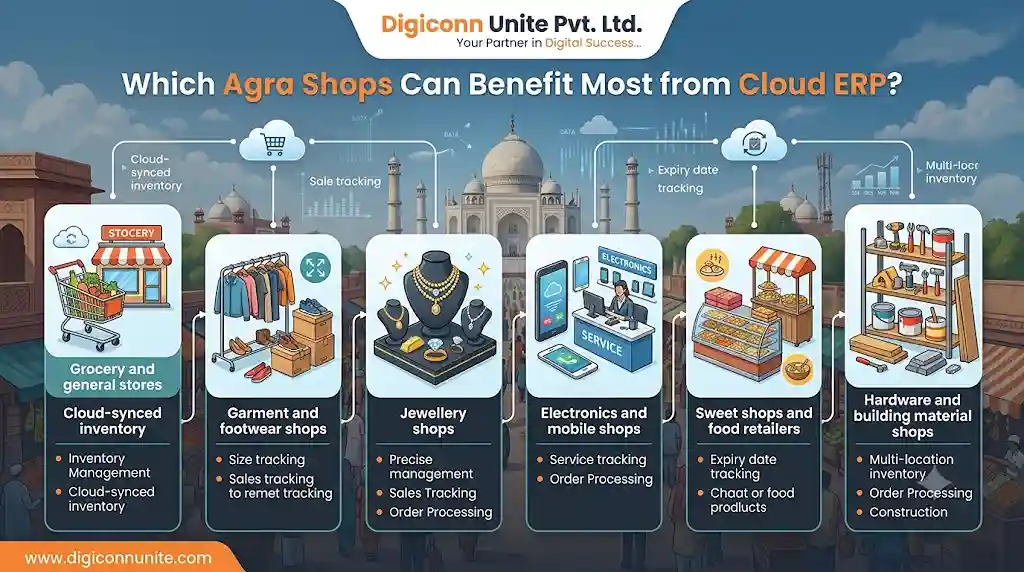
The value of ERP depends on how your shop operates. Different retail categories have different stock and billing requirements.
1. Grocery and general stores
These shops often handle many products, frequent purchases, different tax rates and fast-moving inventory. Useful features include barcode billing, purchase management, stock alerts and expiry tracking where relevant.
2. Garment and footwear shops
A single product may have multiple sizes, colours and designs. The ERP should manage product variants properly, so staff can identify exactly which size or colour is available.
3. Jewellery shops
Inventory management may require item-level identification, weight, purity, making charges and detailed transaction records. A generic ERP should not be assumed to support these requirements without configuration.
4. Electronics and mobile shops
Serial numbers, IMEI numbers, warranties, purchase costs and product returns can make inventory management more demanding. Check whether the system supports these fields and workflows.
5. Sweet shops and food retailers
Batch information, production, expiry, wastage and stock movement may matter more than ordinary product counting.
6. Hardware and building material shops
Different units of measurement, bulk quantities, supplier rates and credit sales can make purchasing and inventory control complicated.
You May Like Also: How to Choose the Right Software Development Provider
When Is Cloud ERP Actually Worth the Money?
Cloud ERP starts making sense when the cost of managing your current process becomes greater than the cost of improving it.
Consider these situations:
You regularly find differences between physical and recorded stock
Your register shows 20 units, but the shelf has only 13. The difference may come from unrecorded sales, purchase-entry errors, damaged products or returns.
An ERP can improve stock visibility by connecting sales, purchases and stock adjustments. It will not automatically eliminate errors if employees enter incorrect information.
You manage more than one shop
Suppose you have two retail outlets in Agra. Without a connected system, you may need separate reports from both locations before understanding total sales and stock.
A cloud ERP with multi-branch support can provide centralised reporting and help you monitor stock transfers.
You depend on one employee for business information
If only one person knows supplier balances, product costs or outstanding customer payments, the business becomes difficult to manage when that person is unavailable.
Shared records and role-based access can reduce this dependency.
You spend too much time preparing daily reports
If employees manually combine billing data, purchase records and expenses every evening, reporting becomes slow and error-prone.
An integrated system can generate reports from recorded transactions, provided the data is entered correctly.
When Cloud ERP May Not Be Worth It
This is the part many software comparisons overlook: not every shop needs an ERP.
You may not need one if:
-
You operate a single small counter.
-
Your product catalogue is limited.
-
You have very few employees.
-
Your existing billing software manages stock accurately.
-
Your accountant already handles your records efficiently.
-
You do not need remote or multi-branch reporting.
-
Your current business problems are caused by poor data entry rather than missing software.
For example, a small shop that sells a limited number of products and maintains accurate daily records may gain little from implementing a large ERP platform.
Counter-intuitive point: Buying more software can make a small business less efficient. More screens, permissions, processes and data-entry requirements can slow employees down when the business does not need those features.
Start with the smallest system that solves the actual problem.
Cloud ERP vs Traditional Offline Software
Cloud ERP and offline software have different strengths. The right choice depends on how your shop operates.
|
Factor |
Cloud ERP |
Offline or locally installed software |
|---|---|---|
|
Access |
Usually available through supported internet-connected devices |
Often limited to installed devices or local networks |
|
Remote monitoring |
Easier when supported |
May require additional remote access |
|
Updates |
Often managed by the provider |
May require manual updates |
|
Infrastructure |
Hosting managed by the provider |
Local hardware and maintenance may be required |
|
Internet dependency |
Depends on the system's offline capabilities |
Basic local operations can continue without internet |
|
Data backup |
Provider may offer managed backups |
Business may need to manage backups |
|
Multiple branches |
Centralised access is often easier |
May require additional configuration |
A cloud system is not automatically safer or more reliable. Its security also depends on provider controls, account permissions, backup procedures and how your employees use it.
The internet problem: ask this before buying
Imagine your shop is crowded during the evening and the internet connection stops working.
Can your staff still:
-
Create invoices?
-
Print bills?
-
Check available stock?
-
Record cash and UPI payments?
-
Save transactions for later synchronisation?
Some systems stop working when disconnected. Others provide limited offline billing and synchronise transactions after connectivity returns.
If your shop depends on uninterrupted counter billing, test this scenario yourself before signing a contract.
Hidden Costs: The Subscription Is Not the Full Cost
A cloud ERP subscription may look affordable, but the total cost includes more than the monthly or annual licence.
Before choosing a system, calculate these expenses:
|
Cost component |
What to check |
|---|---|
|
Subscription |
Per-user, per-branch or per-device charges |
|
Setup |
Initial configuration and business settings |
|
Data migration |
Moving products, customers, suppliers and opening balances |
|
Training |
Teaching staff how to use the software |
|
Customisation |
Special reports, invoice formats and business workflows |
|
Integrations |
Accounting, payment, e-commerce or other connections |
|
Hardware |
Barcode scanners, printers and compatible devices |
|
Support |
Renewal fees, support availability and service conditions |
The actual cost of migration can be significant. Duplicate product names, incorrect stock quantities, missing supplier details and inconsistent units can create problems when moving from Excel or an older billing system.
Ask the provider exactly what data will be transferred. "Migration included" is not enough information.
Retail ERP implementation research also identifies migration time, integration, staff training, security and pricing structures as important concerns for retailers.
GST, Billing and Accounting: What Should Agra Shops Check?
For Indian retailers, billing and accounting requirements should be part of the software evaluation.
Do not assume that an ERP is GST-compliant simply because its website displays a GST logo.
Check whether it supports the requirements relevant to your business:
-
GST tax invoice fields.
-
Correct product tax configuration.
-
HSN/SAC information where applicable.
-
Sales and purchase reports.
-
Credit notes and sales returns.
-
Payment and outstanding balance records.
-
Accounting exports or integration with your accountant's software.
-
E-invoicing and e-way bill functionality where applicable.
Your GST requirements depend on your business, transactions and applicable rules. Confirm compliance requirements with your CA before implementation.
A useful test is to create an actual sample sale, return the product, record a supplier purchase and generate the reports your accountant needs. This reveals more than a standard software demonstration.
A Simple Example: How Cloud ERP Can Change Daily Shop Operations
Imagine a footwear retailer in Agra selling shoes in different sizes and colours.
Before using an integrated system:
-
Staff prepare bills using billing software.
-
Someone updates stock in Excel.
-
Purchase details are maintained separately.
-
The owner calls the shop to check available sizes.
-
Daily sales are manually combined into a report.
With a properly configured ERP:
-
Staff select the correct product variant during billing.
-
The system records the sale and updates stock.
-
Purchase entries increase inventory.
-
The owner checks supported stock and sales reports remotely.
-
Branch managers can view their permitted business information.
This can reduce repeated work, but only if the product catalogue is accurate and employees follow the same stock-entry process.
If the same shoe is recorded under three different product names, the ERP will not magically understand that they are the same item.
Clean data is more valuable than an impressive dashboard.
Step-by-Step Checklist Before Buying Cloud ERP
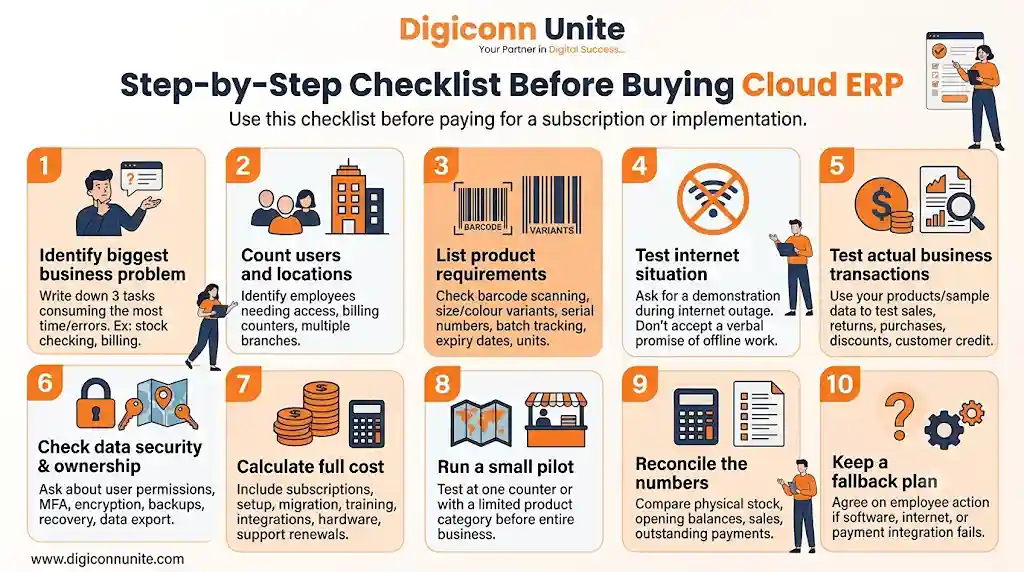
Use this checklist before paying for a subscription or implementation.
Step 1: Identify your biggest business problem
Write down the three tasks that consume the most time or create the most errors. Examples include stock checking, billing, purchase recording or branch reporting.
Step 2: Count users and locations
Identify how many employees need access, how many billing counters you operate and whether you have multiple branches.
Step 3: List your product requirements
Check whether your business needs barcode scanning, size and colour variants, serial numbers, batch tracking, expiry dates, multiple units or stock transfers.
Step 4: Test your internet situation
Ask the provider to demonstrate what happens during an internet outage. Do not accept a verbal promise that the system will work offline.
Step 5: Test actual business transactions
Use your own products and sample data to test sales, returns, purchases, discounts, customer credit and reports.
Step 6: Check data security and ownership
Ask about user permissions, multi-factor authentication, encryption, backups, recovery procedures and data export.
Step 7: Calculate the full cost
Include subscriptions, setup, migration, training, integrations, hardware and support renewals.
Step 8: Run a small pilot
Test the system at one counter or with a limited product category before moving the entire business.
Step 9: Reconcile the numbers
Compare physical stock, opening balances, sales totals and outstanding payments between the old and new systems.
Step 10: Keep a fallback plan
Agree on what employees should do if the software, internet connection or payment integration becomes unavailable.
How to Calculate Whether ERP Will Pay for Itself
Instead of asking whether cloud ERP is cheap, calculate whether it can save more money and time than it costs.
Use this simple framework:
Monthly net benefit = Monthly measurable savings − Monthly ERP operating cost
Your measurable savings may include:
-
Reduced time spent preparing reports.
-
Fewer stock discrepancies.
-
Less duplicate data entry.
-
Reduced billing errors.
-
Better identification of slow-moving inventory.
-
Fewer unnecessary purchases caused by poor stock visibility.
For example, if your shop saves 20 employee hours per month, calculate the actual labour value of those hours. Add any verified reduction in errors or unnecessary stock purchases.
Do not count every possible improvement as guaranteed savings. Measure the results during a pilot and compare them with the full software cost.
A useful evaluation period is long enough to include normal sales days, busy periods, purchase cycles and stock reconciliation.
Questions to Ask an ERP Provider Before You Buy
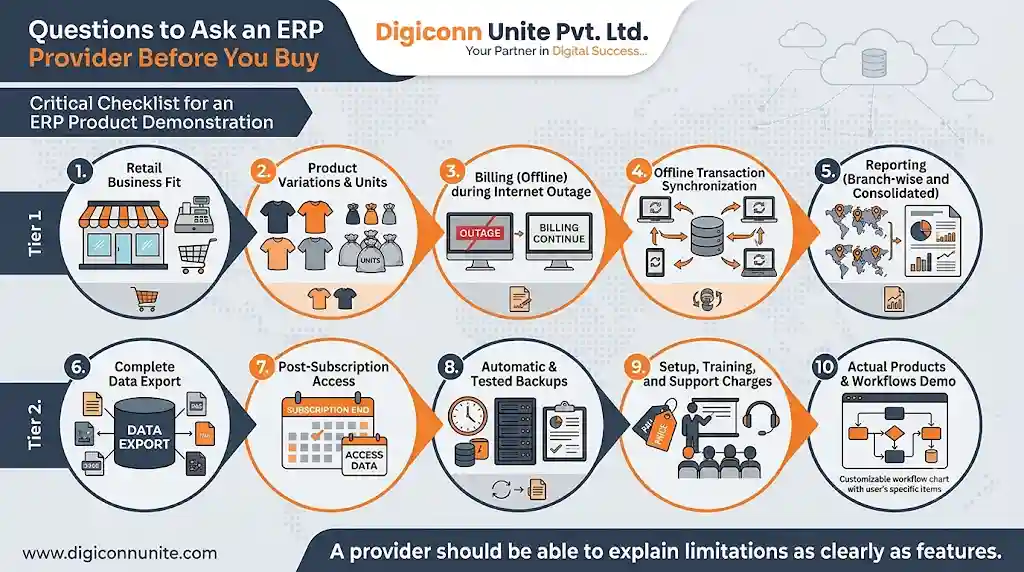
Use these questions during a product demonstration:
-
Does the system support my exact type of retail business?
-
Can it manage my product variations and units?
-
Does billing work during an internet outage?
-
How are offline transactions synchronised?
-
Can I access branch-wise and consolidated reports?
-
Can I export my complete business data?
-
What happens if I stop the subscription?
-
Are backups automatic, and how often are they tested?
-
What are the setup, training and support charges?
-
Can you demonstrate the software using my actual products and workflows?
A provider should be able to explain limitations as clearly as features.
Final Verdict: Is Cloud ERP Worth It for Agra Shops?
Yes, when it solves measurable business problems. No, when you are paying for features your shop will never use.
For a growing retailer, cloud ERP can connect billing, inventory, purchases, accounts and branch reporting. For a small shop with simple operations, a reliable billing and inventory system may be enough.
Before investing, test the software with real transactions, verify offline billing, calculate the full cost and check how easily you can export your data. The best system is the one your employees can use correctly every day—not the one with the longest feature list.
Frequently Asked Questions
1. Is cloud ERP suitable for small shops in Agra?
Yes, if the shop needs connected billing, inventory, purchase and accounting records. A small single-counter shop with simple operations may find basic billing and inventory software more practical.
2. Does cloud ERP work without an internet connection?
It depends on the software. Some systems stop working without internet, while others support offline billing and synchronise saved transactions later. Always test offline functionality before purchasing.
3. Can cloud ERP manage GST billing?
Many ERP systems provide GST-related billing and reporting features. However, businesses should verify the required tax configuration, invoice fields, reporting and applicable compliance features with their software provider and CA.
4. Is cloud ERP better than Tally or Excel?
They serve different purposes. Excel is useful for simple records and analysis, while accounting software such as Tally focuses on accounting workflows. ERP connects multiple business operations, but the right choice depends on the features you actually need.
5. Can I manage multiple shop branches using cloud ERP?
Yes, if the selected system supports multi-branch operations. Check whether it can provide branch-wise sales, stock transfers, consolidated reports and role-based employee access.
6. Is my business data safe in cloud ERP?
Cloud ERP can provide security controls such as encryption, backups and access permissions, but security depends on the provider and your own account practices. Ask about backup testing, data export, recovery and multi-factor authentication.
7. How do I move my shop data from Excel to ERP?
Start by cleaning product names, units, stock quantities, customer details and supplier records. Then test the migration using sample data, reconcile opening balances and verify reports before switching completely.
8. Should I choose ready-made ERP or custom business management software?
Ready-made ERP is often suitable when your business follows common retail workflows. Custom software may be worth considering when important business processes cannot be handled effectively by available products. Compare long-term maintenance, integration and ownership costs before deciding.
You May Like Also: ERP Software Cost for Footwear Manufacturing Industry in Agra
Our Social Links:
Related Topics
Explore more about software development:
