



Custom software development is the process of designing, building, testing and maintaining software specifically for a business's requirements. Instead of adapting your business operations to an existing application, you get software designed around your workflows, users, processes and goals.
It is useful for startups, small businesses, growing companies and large organisations that need more control over their operations, want to automate repetitive work, or have requirements that ready-made software cannot handle effectively.
Quick Answer
Custom software development means creating a software solution specifically for an organisation or user. It can include web applications, mobile apps, CRM systems, ERP platforms, inventory management software, booking systems, customer portals and business automation tools.
The objective is to solve a specific problem, improve efficiency and create a system that can grow with the business.
Key Takeaways
-
Built around your requirements: Software is designed for your actual business processes.
-
Greater control: You can define features, workflows, user roles and integrations.
-
Improved efficiency: Automate repetitive tasks and reduce manual work.
-
Scalable architecture: Add features and support more users as requirements change.
-
System integration: Connect different business tools and databases where technically feasible.
-
Long-term responsibility: Updates, security, maintenance and support need ongoing planning.
-
Higher initial investment: Custom development can require more time and money than adopting an existing product.
Who Needs Custom Software Development?
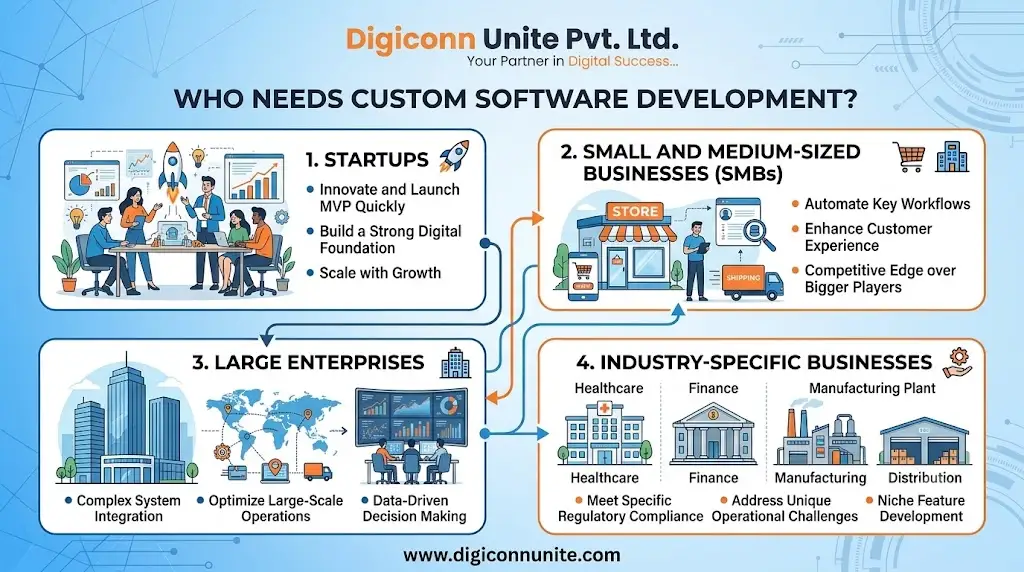
Custom software is not necessary for every business. An existing application may be sufficient if it already meets your requirements.
Custom development becomes useful when standard software creates limitations, requires too many workarounds or cannot support an important business process.
The following businesses and professionals may benefit from it.
1. Startups
Startups often need a product that supports a specific business idea. A custom web or mobile application can help them launch an MVP (Minimum Viable Product), test their concept and collect feedback from early users.
Examples include:
-
Online service marketplaces.
-
Food delivery applications.
-
Customer booking platforms.
-
Subscription-based applications.
-
On-demand service platforms.
2. Small and Medium-Sized Businesses
Growing businesses may struggle with spreadsheets, disconnected applications and manual processes.
Custom software can bring essential operations into one system.
Examples include:
-
Inventory management.
-
Billing and invoicing.
-
Customer relationship management.
-
Employee management.
-
Order tracking.
3. Large Enterprises
Large organisations may operate across multiple departments, branches and locations. Their software requirements can involve complex permissions, reporting, integrations and security controls.
Custom enterprise software can connect different departments and support organisation-specific workflows.
4. Industry-Specific Businesses
Some industries have processes that general-purpose software does not fully support.
Examples include:
-
Healthcare: Patient management, appointment scheduling and healthcare portals.
-
Education: Learning management systems and student information platforms.
-
Real estate: Property management, lead tracking and booking systems.
-
Manufacturing: Production planning, inventory and quality management.
-
Logistics: Fleet tracking, delivery management and route coordination.
-
Retail: Point-of-sale systems, stock management and order processing.
Explore Our This Article: Top 10 Leading Software Development Company in Agra
What Are the Main Types of Custom Software?
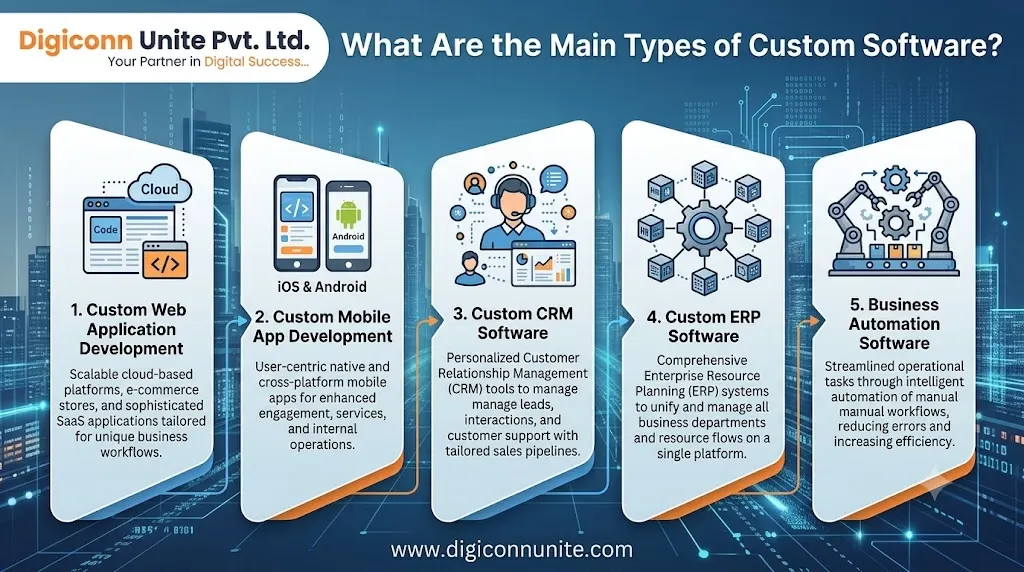
Custom software can take different forms depending on the problem you need to solve.
1. Custom Web Application Development
A web application runs through a web browser and can be accessed from supported devices without installing a traditional desktop application.
Common examples include:
-
Customer dashboards.
-
Online booking systems.
-
Business management portals.
-
E-commerce platforms.
-
Employee portals.
-
Vendor management systems.
A web application can be developed with responsive layouts so users can access it from desktops, tablets and smartphones.
2. Custom Mobile App Development
Mobile app development involves creating applications for smartphones and tablets.
Businesses may choose:
-
Android app development: Applications for Android devices.
-
iOS app development: Applications for Apple devices.
-
Cross-platform development: Applications built using a shared codebase for multiple platforms, depending on the technology and requirements.
Examples include delivery apps, customer service apps, fitness applications and field employee applications.
3. Custom CRM Software
Customer Relationship Management (CRM) software helps businesses manage customer information and sales activities.
A custom CRM can include:
-
Lead management.
-
Customer records.
-
Sales pipeline tracking.
-
Follow-up reminders.
-
Communication history.
-
Sales performance reports.
It is useful when a business has a sales process that standard CRM products cannot accommodate without significant workarounds.
4. Custom ERP Software
Enterprise Resource Planning (ERP) software connects different business functions through a shared system.
Depending on business requirements, an ERP solution may include:
-
Finance and accounting.
-
Inventory management.
-
Procurement.
-
Human resources.
-
Production management.
-
Sales and order processing.
-
Business reporting.
A custom ERP can be designed to support specific workflows and connections between departments.
5. Business Automation Software
Business automation software reduces repetitive manual work through predefined rules, workflows and integrations.
Examples include automated invoice generation, approval workflows, order notifications, employee attendance processing and scheduled reports.
Automation should be applied to processes that are sufficiently understood and stable. Automating a poorly designed workflow can simply make mistakes happen faster.
Visit Also: Role of Business Management Software for Small Business in Agra
Custom Software Development vs Off-the-Shelf Software
The main difference is how the software is designed and how much control you have over its functionality.
|
Comparison |
Custom Software |
Off-the-Shelf Software |
|---|---|---|
|
Development |
Built for specific requirements |
Developed for a broader market |
|
Features |
Selected around your workflows |
Features depend on the product |
|
Initial cost |
Usually higher |
Often lower |
|
Implementation |
May require more development time |
Often quicker to deploy |
|
Flexibility |
Can be tailored to requirements |
Limited to available options |
|
Integrations |
Can be developed for specific systems |
Depends on supported integrations |
|
Maintenance |
Requires an agreed support plan |
Usually handled by the software provider |
|
Ownership |
Depends on the development agreement |
Governed by the vendor's licence and terms |
When Should You Choose Custom Software?
Consider custom development when:
-
Your existing software cannot support essential workflows.
-
Employees repeatedly enter the same information into different systems.
-
You need specific integrations with internal or third-party platforms.
-
Your business has unique operational requirements.
-
You need greater control over the product roadmap.
-
Your software requirements are expected to evolve over time.
When Is Ready-Made Software Better?
Choose an existing product when it already solves your problem, fits your budget and provides the integrations and support you need.
For example, a small business that only needs basic invoicing may not need a custom billing platform. An established accounting product could be more practical.
The right choice is the one that solves your actual problem with the lowest reasonable total cost and operational risk.
How Does the Custom Software Development Process Work?
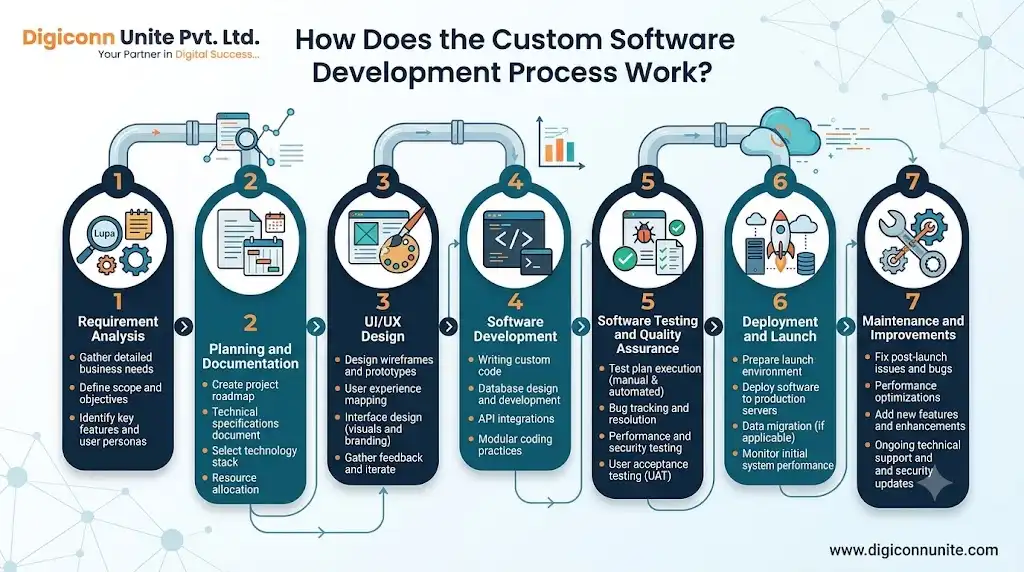
A reliable development project follows a structured process. Each stage should produce something that can be reviewed before the next stage moves forward.
Step 1: Requirement Analysis
The development team first understands the problem the software needs to solve.
This includes:
-
Business objectives.
-
Target users.
-
Existing workflows.
-
Required features.
-
User roles and permissions.
-
Integration requirements.
-
Budget and timeline constraints.
Practical advice: List the problems you want to solve before discussing technical features. This helps prevent unnecessary functionality.
Step 2: Planning and Documentation
Once requirements are understood, the team prepares a development plan.
This may include:
-
Project scope.
-
Functional requirements.
-
Technical requirements.
-
Development milestones.
-
Technology selection.
-
Estimated costs.
-
Testing and delivery plans.
A clear scope helps prevent misunderstandings about what is included in the project.
Step 3: UI/UX Design
UI means User Interface, while UX means User Experience.
The design team plans how users will navigate and interact with the software.
Typical deliverables include:
-
Wireframes.
-
User journey maps.
-
Interface designs.
-
Interactive prototypes.
-
Responsive layouts.
Review the prototype before development begins. Fixing confusing navigation during design is generally easier than rebuilding completed functionality.
Step 4: Software Development
Developers build the application using technologies selected for its requirements.
The technology stack may include:
-
Frontend: React, Angular, Vue.js or other interface technologies.
-
Backend: Node.js, Python, PHP, Java or .NET.
-
Database: PostgreSQL, MySQL, MongoDB or other suitable databases.
-
Mobile: Native Android, native iOS or cross-platform frameworks.
-
Cloud infrastructure: Suitable hosting and cloud services.
The right technology depends on performance, security, integrations, team expertise and long-term maintenance requirements. A popular framework is not automatically the best choice for every project.
Step 5: Software Testing and Quality Assurance
Testing checks whether the software behaves as expected.
Common testing activities include:
-
Functional testing.
-
User interface testing.
-
Compatibility testing.
-
Performance testing.
-
Security testing.
-
Integration testing.
-
User acceptance testing (UAT).
Users should test important workflows before the software goes live. For example, an inventory system should be checked for stock updates, purchase entries, sales transactions and reporting accuracy.
Step 6: Deployment and Launch
After testing and approval, the application is deployed to its production environment.
This stage may include:
-
Server and cloud configuration.
-
Database setup.
-
Domain and SSL configuration.
-
Data migration.
-
User account creation.
-
Backup configuration.
-
Production checks.
A launch plan should also explain how users will access the application and report issues.
Step 7: Maintenance and Improvements
Software development does not end at launch.
The application may require:
-
Security updates.
-
Bug fixes.
-
Performance improvements.
-
Compatibility updates.
-
Backup monitoring.
-
New features.
-
Infrastructure maintenance.
Agree on post-launch support, response times, maintenance costs and responsibilities before signing the development contract.
What Are the Benefits of Custom Software Development?
1. Software That Matches Your Business Processes
You do not have to change every business process to fit a standard application. The software can be designed around your actual requirements.
2. Reduced Manual Work
Automation can reduce repetitive data entry, manual reporting and unnecessary administrative tasks.
3. Better Integration
Custom applications can connect different systems through APIs and other supported integration methods.
For example, an e-commerce application may connect with payment gateways, inventory software, shipping services and customer management tools.
4. Better User Experience
You can design the application around the needs of its actual users, rather than providing features they may never use.
5. Greater Control Over Features
Your business can prioritise new features based on operational needs, customer feedback and changing requirements.
6. Support for Business Growth
A well-planned system can accommodate new users, business locations, products and workflows. However, scalability depends on architecture, infrastructure and ongoing technical decisions.
How Much Does Custom Software Development Cost?
There is no single price for custom software development. The cost depends on the scope, complexity, technology, integrations and ongoing support requirements.
A basic internal application may require less development effort than a multi-platform business system with complex permissions, payment processing and third-party integrations.
Factors That Affect Development Cost
|
Factor |
How It Affects Cost |
|---|---|
|
Project complexity |
More complex workflows require additional development and testing |
|
Number of features |
Additional functionality increases project scope |
|
UI/UX design |
Custom interfaces and user journeys require design work |
|
Platforms |
Supporting web, Android and iOS may increase effort |
|
Integrations |
External APIs and legacy systems may require extra work |
|
Security requirements |
Access controls, audits and testing add effort |
|
Data migration |
Existing data may need cleaning and migration |
|
Maintenance |
Ongoing support and updates create recurring costs |
How to Manage Your Budget
-
Define the essential business problem.
-
Separate must-have features from optional features.
-
Start with a Minimum Viable Product (MVP) when appropriate.
-
Request a written scope and milestone-based estimate.
-
Ask what is included in testing and deployment.
-
Clarify hosting, maintenance and third-party charges.
-
Keep a reasonable contingency for unexpected requirements.
Do not select a development partner based only on the lowest quotation. Compare the proposed solution, project scope, technical approach, delivery process and post-launch support.
What Should You Check Before Hiring a Custom Software Development Company?
Choosing the right development partner can affect the quality, cost and long-term reliability of your software.
Review these points before making a decision:
-
Relevant experience: Has the company developed similar applications or business systems?
-
Technical expertise: Can its team work with the technologies your project requires?
-
Portfolio: Can it demonstrate completed projects and explain its contribution?
-
Development process: Does it follow documented milestones, testing and review?
-
Communication: Will you receive regular updates and access to project progress?
-
Code ownership: Does the agreement clearly explain ownership and access to source code?
-
Security: How will user access, data protection and backups be handled?
-
Support: What happens after the application is launched?
-
Documentation: Will you receive technical and user documentation?
Ask for a demonstration or prototype when the project is complex. A written agreement should cover deliverables, acceptance criteria, payment milestones, intellectual property, support and change requests.
Common Mistakes to Avoid
Custom software projects can become expensive when requirements and responsibilities are unclear.
Avoid these mistakes:
-
Starting development without clear requirements: This creates confusion and repeated changes.
-
Adding too many features initially: Build the essential functionality first.
-
Ignoring end users: Software that employees find difficult to use may not be adopted.
-
Skipping security planning: Consider authentication, permissions, data protection and backups from the beginning.
-
Ignoring integrations: Confirm that required external systems can actually connect.
-
Not testing real workflows: Test the processes users perform every day.
-
Ignoring maintenance: Plan for updates and support before launch.
-
Not defining ownership: Clarify source code, hosting accounts, licences and intellectual property in the contract.
Final Thoughts
Custom software development is a practical option when existing applications cannot support your business requirements effectively. It allows you to build software around your workflows, users, integrations and long-term objectives.
Before investing, identify the problem you want to solve, compare custom development with ready-made alternatives and define a realistic project scope. A clear development plan, experienced team, proper testing and ongoing maintenance will give your software a stronger foundation.
Frequently Asked Questions
1. What is custom software development in simple words?
Custom software development means creating an application specifically for a business or user's requirements. It may be a website, mobile application, CRM, ERP or another business management system.
2. What are examples of custom software?
Examples include custom CRM platforms, inventory management systems, employee management software, healthcare applications, booking systems, e-commerce platforms, logistics software and enterprise resource planning systems.
3. Is custom software better than ready-made software?
Not always. Custom software is useful when a business has specific requirements that existing products cannot handle effectively. Ready-made software is often more practical when it already provides the required features at a suitable cost.
4. How long does custom software development take?
The timeline depends on the project scope, complexity, integrations, platforms and testing requirements. A small application may take less time than a large enterprise platform. Ask the development company for a milestone-based timeline after requirement analysis.
5. Is custom software development expensive?
It can have a higher initial cost than ready-made software because it is designed and developed for specific requirements. The total cost should also include hosting, maintenance, updates, third-party services and future improvements.
6. What technologies are used for custom software development?
Technologies depend on the project. Common options include React, Angular, Vue.js, Node.js, Python, PHP, Java, .NET, PostgreSQL, MySQL and MongoDB. Mobile applications may use native Android and iOS technologies or cross-platform frameworks.
7. What is an MVP in software development?
A Minimum Viable Product (MVP) is an early version of a product containing the essential features needed to test its core purpose with users. It helps a business gather feedback before investing in a larger product.
8. Who owns custom-developed software?
Ownership depends on the development contract, intellectual property terms and applicable law. Before starting a project, clarify who owns the source code, designs, documentation and other deliverables.
9. Does custom software need regular maintenance?
Yes. Software may need security updates, bug fixes, compatibility improvements, backups and performance monitoring. A maintenance plan helps keep the application reliable after launch.
10. How do I start a custom software development project?
Start by identifying the problem, defining your users, listing essential features and setting a budget. Then discuss the requirements with a development company and request a project scope, technical proposal and estimated timeline.
You May Like Also: Is There Web App Development in Agra
Our Social Links:
Related Topics
Explore more about software development:
