



User Acceptance Testing (UAT) in software development is the final testing phase in which actual users or business representatives verify whether a software application meets business requirements and works correctly in real-world situations. It helps identify problems that technical testing may miss before a product goes live. UAT ensures that the software is not only technically functional but also useful, practical, and ready for its intended users.
Planning a software project and want to avoid costly mistakes before launch? Connect with Digiconn Unite, a leading software development company in Agra, for business-focused software development solutions designed around your requirements.
What Does UAT Mean in Software Development?
UAT stands for User Acceptance Testing. It is also known as acceptance testing or end-user testing.
During UAT, selected users test the application using realistic business scenarios. They check whether the software performs the tasks they actually need to complete.
For example, imagine a company developing an online shopping application. Developers may confirm that the payment button works correctly. However, during UAT, a business user might discover that customers cannot easily apply discount coupons while checking out.
This is an important difference. Technical testing checks whether a feature works, while UAT checks whether it works correctly for the business and its users.
Visit Also: What Is the Software Development Life Cycle
Why Is UAT Important in Software Development?
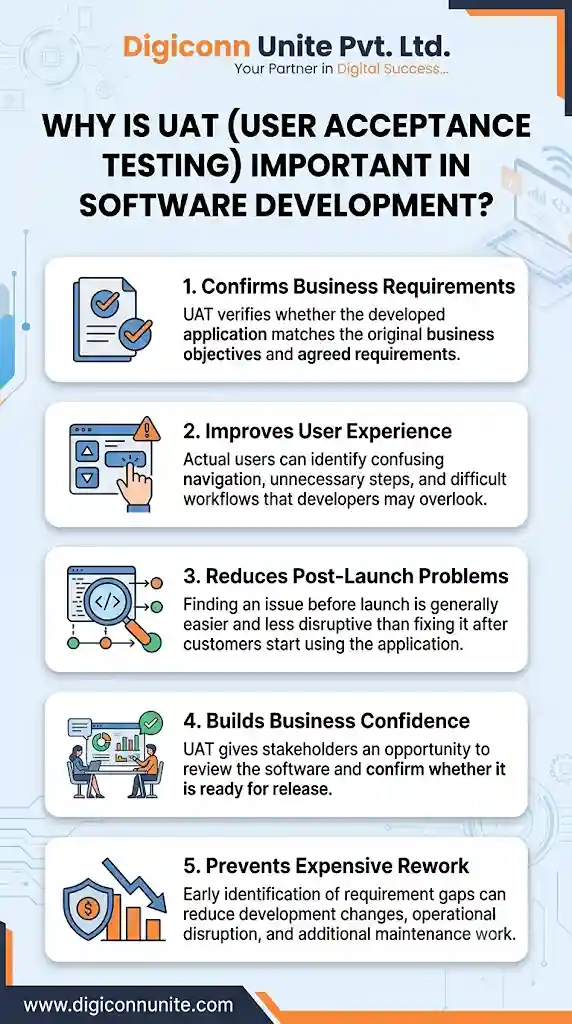
A software application can pass multiple technical tests and still fail to satisfy its users. This often happens when developers misunderstand business requirements or overlook real-world workflows.
UAT helps prevent these issues before deployment.
Here are some important benefits:
1. Confirms Business Requirements
UAT verifies whether the developed application matches the original business objectives and agreed requirements.
2. Improves User Experience
Actual users can identify confusing navigation, unnecessary steps, and difficult workflows that developers may overlook.
3. Reduces Post-Launch Problems
Finding an issue before launch is generally easier and less disruptive than fixing it after customers start using the application.
4. Builds Business Confidence
UAT gives stakeholders an opportunity to review the software and confirm whether it is ready for release.
5. Prevents Expensive Rework
Early identification of requirement gaps can reduce development changes, operational disruption, and additional maintenance work.
Types of User Acceptance Testing
Different projects require different types of acceptance testing. The following are commonly used approaches.
|
Type of UAT |
Purpose |
Example |
|---|---|---|
|
Business Acceptance Testing (BAT) |
Checks business objectives |
Verifying an invoicing workflow |
|
Operational Acceptance Testing (OAT) |
Checks operational readiness |
Backup and recovery verification |
|
Contract Acceptance Testing |
Checks agreed contractual requirements |
Confirming required features |
|
Regulatory Acceptance Testing |
Checks regulatory requirements |
Verifying required compliance workflows |
|
Alpha Testing |
Internal user evaluation |
Employees testing a new application |
|
Beta Testing |
External user evaluation |
Selected customers testing an application |
Not every project needs all these testing types. The appropriate approach depends on the software, industry, business requirements, and release risks.
You May Like Also: How to Choose the Right Software Development Provider
UAT vs QA Testing: What Is the Difference?
One common misunderstanding in software development is treating UAT and Quality Assurance (QA) testing as the same activity.
Although both help improve software quality, their objectives are different.
|
Comparison |
QA Testing |
UAT |
|---|---|---|
|
Main focus |
Technical quality |
Business acceptance |
|
Performed by |
QA engineers and testers |
Business users and stakeholders |
|
Main objective |
Identify software defects |
Verify business requirements |
|
Testing approach |
Functional and technical test cases |
Real-world business scenarios |
|
Timing |
Throughout development |
Usually before final release |
|
Final outcome |
Quality verification |
Acceptance or rejection |
Important insight: Passing QA testing does not automatically mean software is ready for release. A technically correct application can still fail UAT because it does not support the actual business workflow.
Step-by-Step UAT Process in Software Development
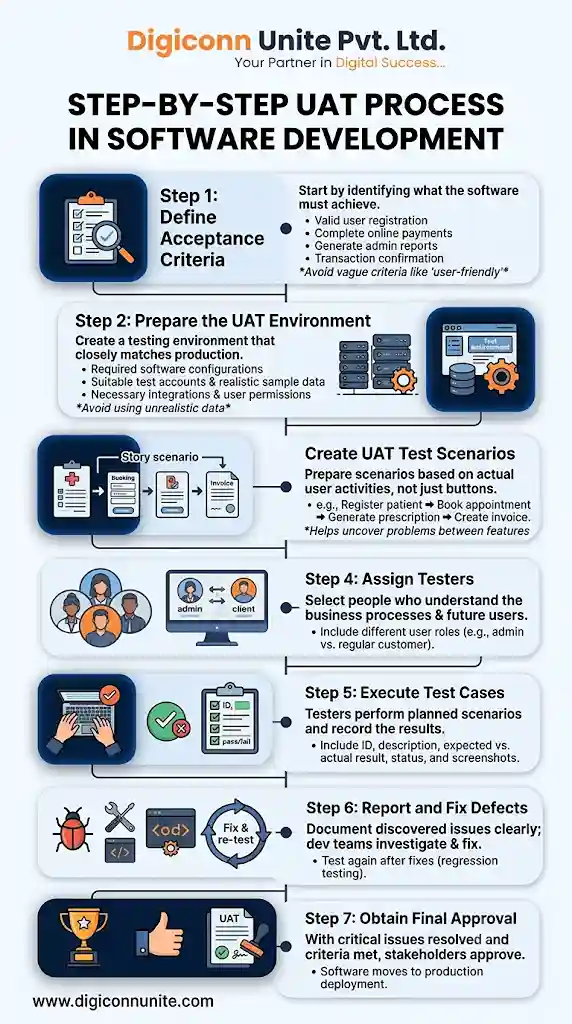
A structured UAT process helps teams avoid confusion and incomplete testing. Here are the main stages.
Step 1: Define Acceptance Criteria
Start by identifying what the software must achieve. Acceptance criteria should be specific, measurable, and connected to business requirements.
For example:
-
Users can register with valid information.
-
Customers can complete online payments.
-
Administrators can generate reports.
-
Users receive confirmation after successful transactions.
Avoid vague requirements such as "the application should be user-friendly."
Step 2: Prepare the UAT Environment
Create a testing environment that closely matches the production environment.
It should include:
-
Required software configurations.
-
Suitable test accounts.
-
Realistic sample data.
-
Necessary integrations.
-
Appropriate user permissions.
Using unrealistic data can create misleading test results.
Step 3: Create UAT Test Scenarios
Prepare scenarios based on actual user activities rather than simply testing individual buttons.
For example, in a healthcare management system, a complete scenario could involve registering a patient, booking an appointment, generating a prescription, and creating an invoice.
This helps uncover problems between connected features.
Step 4: Assign Testers
Select people who understand the business processes and will eventually use the application.
Include different user roles where necessary. An administrator and a regular customer may experience the same application differently.
Step 5: Execute Test Cases
Testers perform the planned scenarios and record the results.
Each test should include:
-
Test case ID.
-
Scenario description.
-
Expected result.
-
Actual result.
-
Pass or fail status.
-
Supporting screenshots or evidence.
Step 6: Report and Fix Defects
When testers discover an issue, they should document it clearly.
Development teams then investigate, prioritise, and fix the reported problems.
After a fix, the affected scenario should be tested again. Regression testing may also be necessary to ensure that the change has not affected other features.
Step 7: Obtain Final Approval
Once critical issues are resolved and acceptance criteria are satisfied, authorised stakeholders provide their approval.
The software can then move towards production deployment according to the release plan.
Practical UAT Checklist Before Software Launch
Use this checklist to evaluate whether your application is ready for user acceptance.
Common UAT Mistakes That Businesses Should Avoid
Even experienced development teams can make mistakes during acceptance testing.
Testing Only Perfect Scenarios
Many teams test only successful user journeys. However, real users make mistakes, enter incomplete information, and experience unexpected situations.
Test negative scenarios, invalid inputs, interrupted transactions, and unusual workflows.
Involving Users Too Late
Waiting until the final days before launch can create unnecessary pressure. Involve business representatives early so that requirement gaps can be identified sooner.
Treating UAT as a Formality
UAT should not become a process where stakeholders simply approve the software without testing it properly. Approval must be based on actual results and documented evidence.
Ignoring User Feedback
Not every user suggestion requires a development change. However, recurring feedback about confusing workflows or missing functionality deserves serious attention.
Counter-Intuitive UAT Insights Most Businesses Overlook
A few practical insights can make acceptance testing more effective:
-
More test cases do not always mean better UAT: Testing important end-to-end workflows can reveal more meaningful problems than hundreds of isolated button checks.
-
The person who requested a feature may not be its best tester: Actual end users often understand operational difficulties better than project decision-makers.
-
A passed test does not guarantee business success: Acceptance confirms agreed requirements, not future customer satisfaction or market demand.
-
Some issues are process problems, not software defects: If users cannot complete a workflow, the root cause may be unclear business rules rather than faulty code.
These insights help businesses focus on practical software readiness instead of treating UAT as just another testing stage.
How Digiconn Unite Helps Businesses Build Reliable Software
Successful software development requires proper planning, development, quality assurance, and user feedback. Each stage contributes to creating an application that supports real business needs.
Digiconn Unite provides software development solutions focused on business requirements, application functionality, usability, and performance.
As a software development company in Agra, Digiconn Unite understands the importance of building solutions that support everyday business operations.
Whether you need custom business software, web applications, mobile applications, or workflow automation, a structured development and testing approach can help reduce project risks and improve software quality.
Conclusion
User Acceptance Testing is an essential part of delivering reliable software. It connects technical development with real business expectations and helps identify problems before an application reaches its intended users.
By defining clear acceptance criteria, testing realistic workflows, involving actual users, and resolving critical issues, businesses can improve software readiness and reduce post-launch risks.
Frequently Asked Questions (FAQs)
1. What is UAT in software development?
UAT is the final acceptance testing phase in which actual users verify whether software meets business requirements and performs expected tasks correctly.
2. Who performs User Acceptance Testing?
Business users, clients, product owners, and other authorised stakeholders generally perform UAT because they understand the intended business processes.
3. When is UAT performed?
UAT is generally performed after the required development and QA testing are completed and before production deployment.
4. How long does UAT take?
UAT duration depends on project complexity, the number of features, test scenarios, user availability, and the number of issues discovered. Small applications may require a few days, while complex enterprise systems can require several weeks.
5. What happens if software fails UAT?
The development team reviews the failed test cases, identifies the underlying issues, implements fixes, and conducts retesting before seeking acceptance again.
6. Is UAT mandatory for every software project?
UAT is not legally mandatory for every project, but it is highly recommended for applications where business workflows, customer experience, and operational accuracy are important.
7. What is the difference between UAT and beta testing?
UAT checks whether software meets agreed business requirements, while beta testing involves releasing a pre-release version to selected external users to gather feedback from real-world usage. Their activities can sometimes overlap.
Explore this also: How Long Does It Take to Build Custom Software
Our Social Links:
Related Topics
Explore more about software development:
