



The most effective way to automate business operations with custom software is to identify repetitive tasks, map how information moves between departments, and build software that handles those workflows with minimal manual intervention. Instead of managing orders, customer records, invoices, approvals and reports across disconnected tools, businesses can use one connected system designed around their actual processes.
Custom software automation is particularly useful for business owners, startup founders, operations managers, manufacturing companies, distributors, service providers, retailers and growing organisations that want better control over daily operations.
Looking for top-tier tech solutions nearby? Choose Digiconn Unite, Agra’s trusted team for custom software development.
Quick Answer: How Does Custom Software Automate Business Operations?
Custom software automates business operations by replacing repetitive manual work with predefined digital workflows. It can automatically collect information, assign tasks, generate documents, send notifications, update records, process approvals and create reports.
For example, when a customer places an order, custom software can record the order, check inventory, notify the fulfilment team, generate an invoice and update the order status without requiring employees to enter the same information repeatedly.
Key Takeaways
-
Identify repetitive tasks: Find processes that consume employee time every day.
-
Connect departments: Share information between sales, accounts, HR, inventory and operations.
-
Reduce manual errors: Use validation rules and automated calculations.
-
Improve visibility: Monitor tasks, orders, payments and performance from a central dashboard.
-
Automate approvals: Route requests to the right person based on predefined rules.
-
Protect business data: Use role-based access, backups and audit logs.
-
Choose software that fits your workflow: Build features around actual business requirements instead of changing your processes to fit unsuitable software.
You May Like Also: What Is Custom Software Development
How to Automate Business Operations with Custom Software?
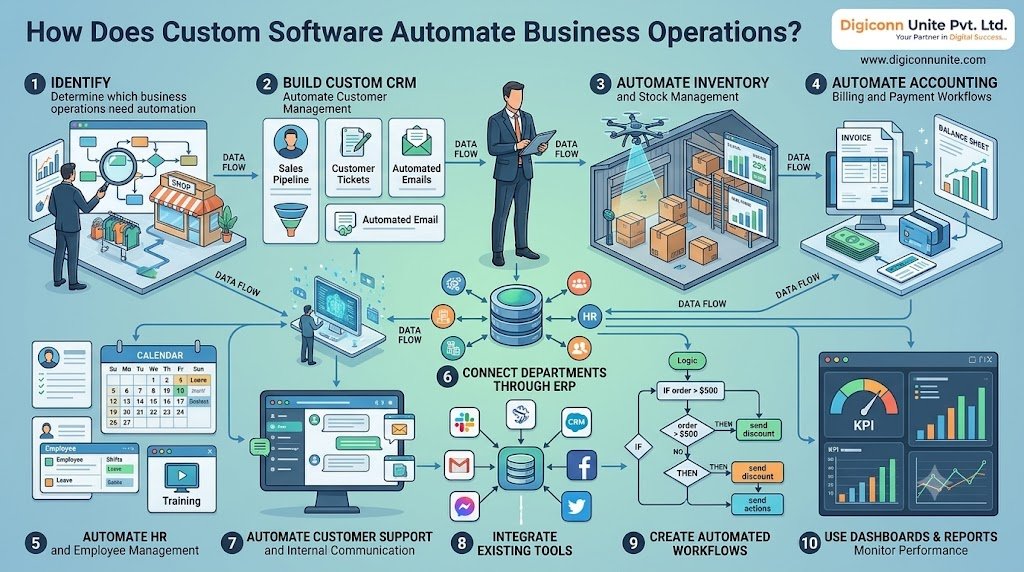
1. Identify Which Business Operations Need Automation
Do not start custom software development by listing features you want. Start by identifying the operational problems you need to solve.
Observe how employees complete their daily work. Look for tasks that involve repeated data entry, manual calculations, spreadsheet updates, approval delays or frequent follow-ups.
Common business processes suitable for automation
|
Business operation |
Manual problem |
Possible automation |
|---|---|---|
|
Sales management |
Employees update leads manually |
Automatic lead assignment and status updates |
|
Inventory management |
Stock is checked using spreadsheets |
Automatic stock updates and low-stock alerts |
|
Accounting |
Invoices are prepared manually |
Automated invoice generation |
|
Human resources |
Leave requests are handled through messages |
Digital leave approval workflows |
|
Customer support |
Requests are assigned manually |
Automatic ticket creation and routing |
|
Order management |
Orders are tracked across different systems |
Centralised order processing |
|
Reporting |
Employees prepare reports repeatedly |
Scheduled reports and live dashboards |
|
Document management |
Files are shared through multiple channels |
Centralised document storage and access |
Practical step: Make a list of your ten most repetitive business tasks. Record how often each task happens, who handles it, how long it takes and what errors commonly occur.
Prioritise tasks that are frequent, rule-based and relatively easy to automate.
2. Build Custom CRM Software to Automate Customer Management
A Customer Relationship Management (CRM) system helps businesses organise customer information, sales enquiries, communication and follow-ups.
When customer details are stored in spreadsheets, emails and individual employee records, information becomes difficult to track.
Custom CRM software can bring these activities into one system.
CRM processes you can automate
-
Capture enquiries from website forms.
-
Assign leads to sales representatives.
-
Send enquiry confirmation messages.
-
Schedule follow-up reminders.
-
Track customer conversations.
-
Update lead status automatically.
-
Generate sales pipeline reports.
-
Notify managers about overdue enquiries.
Example: When someone submits an enquiry through your website, the CRM can create a customer record, assign the enquiry to the appropriate sales employee and notify the team.
The sales representative can then record calls, schedule follow-ups and update the lead status. Managers can monitor the pipeline without asking employees for separate spreadsheets.
3. Automate Inventory and Stock Management
Businesses that sell, manufacture or distribute products need accurate inventory information.
Manual stock management can create problems such as incorrect stock counts, delayed replenishment, duplicate entries and difficulty identifying fast-moving products.
Custom inventory management software can connect stock records with purchases, sales and order processing.
Useful inventory automation features
Automatic stock updates: Reduce inventory when an order is confirmed or fulfilled, according to your defined workflow.
Low-stock alerts: Notify the purchasing team when inventory reaches a predefined reorder level.
Purchase order management: Create purchase requests when stock needs replenishment.
Supplier records: Maintain supplier details, product information and purchase history.
Stock movement tracking: Record incoming goods, outgoing products, returns and warehouse transfers.
Inventory reports: Monitor available stock, reorder requirements and product movement.
For businesses with multiple warehouses, the system can also provide location-wise inventory visibility.
4. Automate Accounting, Billing and Payment Workflows
Financial administration often involves repetitive tasks such as preparing invoices, recording payments, checking outstanding balances and following up on overdue accounts.
Custom business software can simplify these processes by connecting customer records, orders and financial workflows.
Financial tasks you can automate
-
Generate invoices from confirmed orders.
-
Calculate taxes using configured rules.
-
Record payment status.
-
Send payment reminders.
-
Track outstanding invoices.
-
Generate expense reports.
-
Notify authorised employees about pending approvals.
-
Export financial records for accounting systems.
For example, when an order is approved, the system can generate an invoice using the stored customer and product information.
Payment status can then be updated through an authorised payment gateway or accounting integration.
Important: Financial automation should include permission controls, transaction logs, validation and appropriate review. Tax calculations and accounting rules must be configured correctly for your business and applicable regulations.
Explore This Blog Also: Custom Software Development Cost in Agra
5. Automate HR and Employee Management
HR teams handle employee records, attendance, leave applications, payroll inputs, onboarding and internal communication.
When these processes rely on paper forms and messages, tracking requests can become difficult.
Custom HR management software can create a structured process for employees and managers.
HR automation opportunities
-
Employee onboarding checklists.
-
Digital leave applications.
-
Manager approval workflows.
-
Attendance records.
-
Shift and duty scheduling.
-
Employee document management.
-
Payroll input preparation.
-
Performance review reminders.
Example: An employee submits a leave request through the HR portal. The software forwards it to the assigned manager, records the approval decision and updates the employee's leave balance based on configured rules.
Sensitive employee information should be protected through role-based permissions and secure data handling.
6. Connect Different Departments Through ERP Software
When sales, inventory, accounts, purchasing and operations use separate systems, employees often enter the same information more than once.
Enterprise Resource Planning (ERP) software connects these business functions through shared data and workflows.
A custom ERP system can be particularly useful when standard software does not support your organisation's specific operational requirements.
Examples of ERP automation
Sales to inventory: A confirmed order updates the relevant stock records.
Purchasing to accounts: An approved purchase order can be linked to supplier and invoice records.
HR to payroll: Approved attendance and leave information can be used as payroll inputs.
Operations to management: Department activity can feed into management dashboards.
Before developing an ERP system, define which departments need to share information and which records should be the source of truth.
Do not automate every department at once. Start with the workflow causing the most operational delays.
7. Automate Customer Support and Internal Communication
Customer requests can arrive through websites, email, phone calls, messaging platforms and social media.
Without a central process, requests may be missed or assigned to the wrong employee.
Custom helpdesk software can organise customer communication and make support work easier to track.
Features worth considering
-
Automatic support ticket creation.
-
Ticket categorisation.
-
Assignment based on department or issue type.
-
Priority levels.
-
Response-time reminders.
-
Escalation for unresolved requests.
-
Customer notification updates.
-
Support performance reports.
For internal communication, workflow notifications can alert employees when a task requires action.
For example, if an order is delayed, the system can notify the responsible operations manager instead of relying on someone to notice the issue manually.
8. Integrate Existing Business Tools With Custom Software
A business may already use accounting software, payment gateways, email platforms, shipping services or customer management tools.
Replacing every existing application is not always necessary.
Custom software can connect suitable applications through APIs (Application Programming Interfaces), webhooks or other supported integration methods.
Common integration examples
|
Business tool |
Possible integration |
|---|---|
|
Payment gateway |
Payment confirmation and transaction status |
|
Accounting software |
Invoice and financial record synchronisation |
|
Email platform |
Automated customer notifications |
|
Website |
Enquiry and order collection |
|
Shipping service |
Delivery and tracking updates |
|
CRM |
Customer records and sales activities |
|
Business analytics |
Performance and operational reporting |
Before integration, check API availability, authentication requirements, usage limits, data formats and ongoing maintenance needs.
A good integration should prevent duplicate records and clearly handle failed or delayed data transfers.
9. Create Automated Workflows Using Business Rules
Workflow automation is the process of defining what should happen when a particular business event occurs.
A workflow normally contains three elements:
-
Trigger: The event that starts the workflow.
-
Condition: The rule that determines what happens next.
-
Action: The task the system performs.
Example: Automated order approval
|
Stage |
System action |
|---|---|
|
New order received |
Create an order record |
|
Payment confirmed |
Update payment status |
|
Stock available |
Send order for fulfilment |
|
Stock unavailable |
Notify the purchasing team |
|
Order dispatched |
Update delivery status |
|
Delivery completed |
Notify the customer and close the order |
A workflow can also include human approval.
For example, a purchase request above a defined amount may require a manager's approval, while smaller requests can follow an authorised automatic process.
Do not automate decisions that need human judgement without a review mechanism. High-value transactions, unusual requests and exceptions should have clear escalation paths.
10. Use Dashboards and Automated Reports to Monitor Performance
Managers need accurate information to make operational decisions.
When reports are prepared manually, the information may become outdated before it reaches the decision-maker.
Custom software can display business activity through dashboards and scheduled reports.
Useful dashboard information
-
Daily sales and order status.
-
Pending customer enquiries.
-
Available inventory.
-
Outstanding payments.
-
Employee task completion.
-
Support ticket status.
-
Department-wise performance.
-
Delayed approvals.
You should also define Key Performance Indicators (KPIs) for each automated process.
For example, an order management workflow can be evaluated using order processing time, fulfilment delays and error rates.
Compare performance before and after implementation. This helps determine whether the automation is actually improving operations.
Custom Software vs Ready-Made Software: Which Should You Choose?
Custom software is not automatically the right choice for every business. The decision depends on your workflows, integration needs, budget and long-term requirements.
|
Factor |
Ready-made software |
Custom software |
|---|---|---|
|
Setup |
Often faster to start |
Requires planning and development |
|
Features |
Based on the vendor's product |
Designed around your requirements |
|
Workflow flexibility |
Limited by available configuration |
Can support specific business workflows |
|
Integrations |
Depends on available integrations |
Can be built around required integrations |
|
Ownership |
Governed by vendor terms |
Depends on contract and intellectual property terms |
|
Maintenance |
Usually managed by the vendor |
Requires an internal or external development team |
|
Scalability |
Depends on product capabilities and plan |
Can be extended as requirements change |
When ready-made software makes sense
Choose an existing product when your business follows standard processes and the software already provides the features and integrations you need.
When custom software makes sense
Consider custom development when:
-
Your business follows specialised workflows.
-
Existing software requires too many workarounds.
-
Several applications need to exchange information.
-
You need a specific approval or reporting process.
-
Your operations require a tailored customer or employee portal.
-
You want greater control over how the system evolves.
A hybrid approach can also work: use established applications for standard functions and build custom software to connect or extend them.
How to Implement Business Automation With Custom Software
A successful automation project needs a clear implementation plan. Follow these steps before starting development.
Step 1: Map your current business process
Document how each task starts, who handles it, what information is required and how the process ends.
Use a simple flowchart to identify unnecessary steps, repeated data entry and approval delays.
Step 2: Choose one high-impact workflow
Start with a process that is frequent, time-consuming and easy to measure.
Examples include lead assignment, invoice generation, stock alerts or leave approvals.
Step 3: Define functional requirements
Prepare a clear list of requirements:
-
User roles and permissions.
-
Required forms and data fields.
-
Workflow triggers and conditions.
-
Notifications and approval rules.
-
Reports and dashboards.
-
Third-party integrations.
-
Security and backup requirements.
Step 4: Select the right technology and architecture
Choose a technology stack based on the system's expected workload, integrations, security needs and development team's expertise.
Plan for reliable data storage, authentication, access controls, error handling and future maintenance.
Step 5: Develop and test a working version
Build a minimum viable product (MVP) with the features needed for the first workflow.
Test normal scenarios, incorrect inputs, duplicate records, failed integrations, permission restrictions and exception handling.
Step 6: Train employees and launch gradually
Train the employees who will use the system. Start with a pilot team or department before expanding across the organisation.
Collect feedback and correct issues that affect daily operations.
Step 7: Monitor and improve
Review system performance, user feedback, error logs and business KPIs.
Update workflows when business rules change. Assign responsibility for software maintenance, backups and security updates.
Security Requirements for Business Automation Software
Automating business operations means handling important information such as customer records, employee details, financial transactions and supplier data.
Security should be part of the development plan, not an additional feature added after launch.
Your software should consider:
-
Role-based access control: Employees should access only the information needed for their jobs.
-
Multi-factor authentication: Add an extra verification step for sensitive accounts.
-
Data encryption: Protect information during transmission and storage where appropriate.
-
Audit logs: Record important user actions and system changes.
-
Regular backups: Maintain tested backups and a recovery process.
-
Secure integrations: Protect API credentials and restrict access.
-
Input validation: Prevent incorrect or unexpected data from entering the system.
-
Monitoring: Detect unusual activity and software failures.
Businesses handling personal information should also assess their obligations under applicable privacy and data protection laws.
How Digiconn Unite Helps Businesses Automate Operations
If your business is spending too much time on manual data entry, disconnected applications or repetitive administrative tasks, custom software may provide a more suitable way to manage operations.
Digiconn Unite provides web and software development services for businesses that need digital solutions built around their operational requirements.
A custom software project can be planned around needs such as:
-
CRM and lead management systems.
-
Inventory and stock management software.
-
ERP and business management systems.
-
Custom dashboards and reporting tools.
-
Workflow and approval automation.
-
Customer and employee portals.
-
API integrations with existing applications.
The development process should begin with understanding your current workflow, identifying the problem and defining the required features. This helps avoid unnecessary development and keeps the project focused on business outcomes.
Final Thoughts
Business automation works best when software solves a clearly identified operational problem. Start by mapping repetitive tasks, choose one high-impact workflow, define the rules and build a system that employees can use without unnecessary complexity.
Custom software can connect departments, reduce duplicate work, improve reporting and give management better control over daily operations. The right solution should fit your business processes, protect your data and remain maintainable as your organisation grows.
Automate the work that slows your business down—not just the tasks that are easiest to automate.
Frequently Asked Questions
1. What is business process automation?
Business process automation (BPA) uses software and predefined rules to perform repetitive business activities with less manual intervention. Examples include invoice generation, lead assignment, approval workflows and inventory notifications.
2. How does custom software help automate business operations?
Custom software automates tasks according to your organisation's specific workflows. It can connect departments, update records, generate reports, send notifications and process approvals through a central system.
3. Which business processes should be automated first?
Start with repetitive, rule-based activities that consume significant employee time or create frequent errors. Common starting points include customer enquiry management, invoice creation, stock updates and employee approvals.
4. Is custom software better than ready-made software?
Not in every situation. Ready-made software is suitable for standard business requirements, while custom software is useful when your workflows, integrations or reporting needs are not adequately supported by existing products.
5. Can custom software integrate with existing business applications?
Yes, when the existing applications provide suitable integration methods such as APIs or webhooks. Integration requirements should be checked before development begins.
6. How much does custom business automation software cost?
The cost depends on the number of features, user roles, integrations, security requirements, design complexity and ongoing support. A detailed requirement analysis is needed before preparing a reliable estimate.
7. How long does it take to develop custom automation software?
The timeline depends on the system's scope and complexity. A small workflow automation project may take less time than a multi-department ERP or business management platform. A defined MVP can help launch essential features before expanding the system.
8. Is custom business software suitable for small businesses?
Yes. Small businesses can start by automating one or two important processes, such as customer follow-ups, billing or inventory tracking. The system can be expanded when operational requirements grow.
9. Does business automation replace employees?
Automation is generally intended to reduce repetitive work and help employees focus on tasks that require communication, problem-solving and decision-making. Human review should remain available for sensitive or unusual cases.
10. How can I measure the success of business automation?
Measure task completion time, manual data-entry requirements, error rates, processing delays, employee workload and system usage before and after implementation. These indicators help show whether the software is delivering practical improvements.
You May Like Also: Role of Business Management Software for Small Business in Agra
Our Social Links:
Related Topics
Explore more about software development:
